
Navigating the requirements for vehicle registration in a new city can often feel like deciphering a complex code. For residents and newcomers to Chicago, understanding how and where to obtain a Chicago City Sticker is a crucial step in ensuring compliance with local ordinances and avoiding potential penalties. While historically these stickers were primarily purchased in person, the digital age has brought increased convenience, allowing for online acquisition. This guide aims to demystify the process, offering a clear pathway to purchasing your Chicago City Sticker online, ensuring you can readily display it and enjoy all that the vibrant city has to offer without unnecessary hassle.

The Chicago City Sticker serves a dual purpose: it’s a mandatory decal for all vehicles registered within the city limits, and it also contributes to funding essential city services. From infrastructure improvements to public safety initiatives, your purchase plays a direct role in the betterment of Chicago. Therefore, understanding the procurement process is not just about avoiding fines; it’s also about actively participating in the civic life of this bustling metropolis. This article will focus exclusively on the most efficient and accessible method: online purchase.
Understanding the Chicago City Sticker
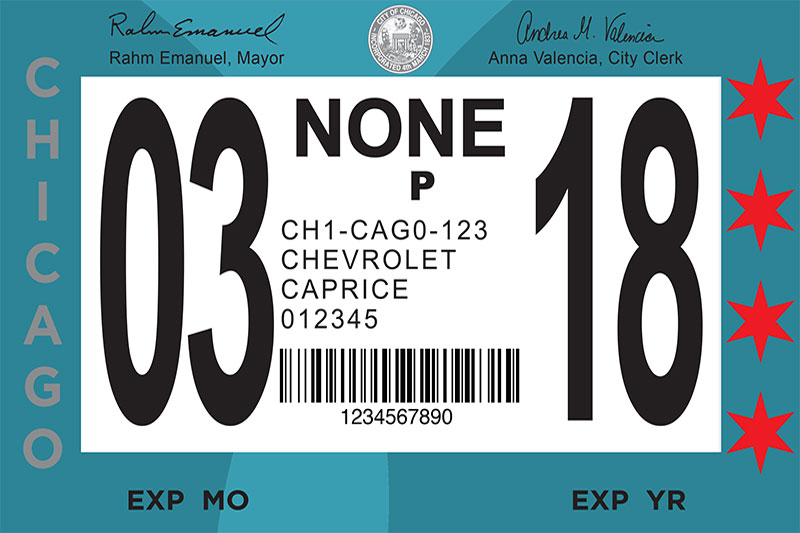
The Chicago City Sticker is a mandatory requirement for all motor vehicles that are regularly used within the city of Chicago. This applies to vehicles registered either to a Chicago address or primarily garaged within the city. The sticker must be purchased within 30 days of establishing residency in Chicago or within 30 days of purchasing a vehicle that will be based in the city. It is typically valid for a one-year period, usually aligning with the vehicle’s license plate renewal cycle, though the city may adjust these timelines.
The purpose of the City Sticker is multifaceted. Primarily, it is a revenue-generating tool for the city. The funds collected from the sale of City Stickers are earmarked for various municipal services, including road maintenance, public transportation enhancements, and parks. Beyond its fiscal role, the City Sticker also serves as a visible indicator of compliance with local law, allowing law enforcement and parking enforcement officials to easily identify vehicles that have met their registration obligations.
Who Needs a Chicago City Sticker?
In Chicago, the requirement for a City Sticker is straightforward: if your vehicle is primarily based or registered within the city, you need one. This includes:
- Chicago Residents: If you live within the city limits of Chicago, your vehicle must display a valid City Sticker. This holds true whether you own the vehicle or lease it.
- Vehicles Garaged in Chicago: Even if you are not a resident of Chicago but your vehicle is regularly garaged or parked within the city for extended periods, a City Sticker is likely required. This can apply to individuals who work in Chicago and frequently park their vehicles there, or businesses that operate within the city.
- Leased Vehicles: If your leased vehicle is registered to a Chicago address, the lessee is responsible for obtaining the Chicago City Sticker.
It’s important to note that “regularly used” and “primarily garaged” are key phrases. The city defines these terms to ensure that individuals who benefit from Chicago‘s infrastructure and services contribute to their upkeep. Failure to comply can result in significant fines, and repeated offenses can escalate penalties. The online purchasing portal simplifies the process of meeting this obligation, making it accessible from the comfort of your home or office.
Key Information for Online Purchase
Before you embark on the online purchase of your Chicago City Sticker, gathering the necessary information will streamline the process. The city’s official portal is designed for efficiency, but having these details readily available will prevent interruptions and ensure accuracy.
- Vehicle Information: You will need your vehicle’s license plate number. Ensure this is accurate, as it is the primary identifier for your vehicle in the system. You may also be asked for the vehicle’s Vehicle Identification Number (VIN), although this is less common for the sticker purchase itself.
- Owner Information: The name of the registered vehicle owner will be required. This should match the name on the vehicle’s title and registration.
- Chicago Address: If you are a Chicago resident, you will need to provide your current Chicago address. This verifies your residency status and determines the correct fee structure.
- Payment Method: A valid credit or debit card is typically required for online transactions. The system will securely process your payment.
- Previous Sticker Information (if applicable): If you are renewing an existing Chicago City Sticker, having your previous sticker’s identification number can sometimes expedite the process, though it’s not always mandatory. The system can often look up your vehicle by its license plate.
Having these pieces of information organized will allow you to navigate the online portal smoothly, minimizing any potential for errors and ensuring that your Chicago City Sticker is purchased accurately and efficiently.
The Official Online Portal for City Sticker Purchase
The most direct and secure method for acquiring your Chicago City Sticker is through the official City of Chicago website. While third-party vendors may exist, they often carry additional fees and may not be as up-to-date with the city’s regulations. Sticking to the official channel guarantees compliance and avoids any unnecessary surcharges. The online portal has been developed to be user-friendly, guiding you through each step of the purchase process.
Navigating the City of Chicago’s Official Website
The official website for Chicago city services is the primary gateway for purchasing your City Sticker. Typically, this can be accessed through a dedicated portal managed by the Chicago Department of Revenue. Search terms like “Chicago City Sticker online” or “City of Chicago vehicle registration” will lead you to the correct page. Once on the site, look for sections related to “Vehicle Stickers,” “City Sticker,” or “Revenue and Taxes.”
The interface is designed for ease of use. You will likely be presented with options to either purchase a new sticker or renew an existing one. If you are a first-time buyer in Chicago, you will select the “new purchase” option. If your previous sticker has expired or is nearing expiration, the “renewal” option is the correct choice. The system will then prompt you to enter the required vehicle and owner information as previously outlined.
Step-by-Step Online Purchase Process
The online purchase of a Chicago City Sticker typically follows a predictable sequence of steps, designed to be intuitive even for those less familiar with online government portals.
- Access the Official Portal: Navigate to the City of Chicago‘s official website and locate the City Sticker purchase section. Bookmark this page for future reference.
- Select Purchase Type: Choose between purchasing a “New” sticker or “Renewing” an existing one. For first-time buyers, “New” is the appropriate selection.
- Enter Vehicle Information: You will be asked to provide your vehicle’s license plate number. Ensure this is entered accurately.
- Provide Owner and Residency Details: Input the registered owner’s name and your Chicago residential address. This confirms your status as a Chicago resident or vehicle owner whose vehicle is primarily garaged within the city.
- Select Vehicle Type and Fees: The system will often categorize vehicles (e.g., passenger cars, trucks, motorcycles) and the corresponding fees will be displayed. These fees can vary based on vehicle type and whether the purchase is made during the early bird period or closer to the deadline.
- Review and Confirm: Before payment, you will have an opportunity to review all entered information for accuracy. It is crucial to double-check all details to prevent any issues with your sticker’s validity.
- Payment: Enter your credit or debit card information to complete the transaction. The website uses secure encryption to protect your financial data.
- Confirmation and Receipt: Upon successful payment, you will receive a confirmation page and often an email containing your order details and a temporary proof of purchase. The physical sticker will be mailed to your provided address.
Tracking Your Order and Receiving Your Sticker
After completing your online purchase, the city typically mails the physical Chicago City Sticker to the address you provided within a specified timeframe. This process usually takes a few business days to a couple of weeks, depending on mail delivery schedules. It’s advisable to order your sticker well in advance of any deadlines to account for potential postal delays.
Some online systems may offer a tracking option for your mailed sticker, allowing you to monitor its progress. Keep the confirmation email and any order number provided, as these are essential for inquiries should there be any issues with delivery. Once received, it is imperative to affix the sticker to the designated area on your vehicle’s windshield as per the city’s instructions. Failure to display the sticker correctly can still lead to citations.
Important Considerations and Tips for a Smooth Purchase
While the online portal simplifies the process, being aware of certain nuances and best practices can further enhance your experience and ensure you remain compliant with Chicago‘s regulations. Planning ahead and understanding potential pitfalls are key to a hassle-free acquisition of your Chicago City Sticker.
Understanding Fees and Deadlines
The City of Chicago often implements a tiered fee structure and specific deadlines for City Sticker purchases. Historically, there has been an “early bird” discount period, where purchasing the sticker before a certain date offers a reduced price. After this early period, the standard fee applies, and purchasing closer to or after the official deadline can incur late fees. These dates are typically announced annually by the city.
- Early Bird Discount: Many residents take advantage of this period to save money. The exact dates for the early bird special are usually communicated on the city’s official website and through official city channels.
- Regular Purchase Period: This is the standard timeframe during which the sticker can be purchased at the regular price.
- Late Purchase Penalty: If the sticker is not purchased by the official deadline, a penalty fee is usually added to the standard cost. This penalty is intended to encourage timely compliance.
It is essential to check the current year’s fee schedule and deadlines on the official City of Chicago website to ensure you are aware of all applicable charges and timelines. Making your purchase within the early bird period is often the most economical choice.
What to Do If You Encounter Issues
While the online system is designed for efficiency, technical glitches or unforeseen issues can sometimes arise. If you experience problems during the online purchase process, such as errors with payment processing, difficulty navigating the site, or if you do not receive your sticker within the expected timeframe, it is important to know where to turn for assistance.
- Customer Service: The City of Chicago typically provides a dedicated customer service line or email address for City Sticker-related inquiries. Look for this contact information on the official website’s City Sticker portal. They can help troubleshoot technical issues, provide information about your order status, and clarify any discrepancies.
- Physical Service Centers: In some instances, if online assistance is not resolving your issue, the city may direct you to a physical service center where you can complete your purchase or resolve a problem in person. However, for most routine online purchases and renewals, the online portal should suffice.
- Documentation: Keep records of your transaction, including order numbers, confirmation emails, and any communication you have with city representatives. This documentation is crucial if you need to dispute a citation or resolve a problem.
By being prepared and knowing how to seek help, you can navigate any challenges that may arise and ensure you obtain your Chicago City Sticker without undue stress.

Ensuring Continued Compliance
Once you have successfully purchased and received your Chicago City Sticker, the responsibility doesn’t end there. Proper display and timely renewal are key to maintaining compliance and avoiding penalties.
- Proper Display: The city provides specific instructions on where to affix the sticker on your vehicle’s windshield. Typically, it’s placed in a visible location, often in the lower corner of the driver’s side windshield. Misplaced or improperly displayed stickers can still result in citations. Always refer to the official guidelines.
- Timely Renewal: Mark your calendar for the expiration date of your sticker and the commencement of the next purchase period. Procrastinating on renewal is the most common reason for accruing late fees and facing citations. Setting reminders on your phone or calendar can be a helpful strategy.
- Updating Information: If your vehicle information changes (e.g., you purchase a new vehicle, or your license plate number changes), you will need to update your City Sticker information accordingly. Similarly, if you move within Chicago or out of the city, there may be implications for your sticker status.
By staying vigilant with these ongoing requirements, you can ensure that your vehicle remains legally compliant on the streets of Chicago, allowing you to focus on enjoying all that this dynamic city has to offer. From the architectural marvels of the Loop to the cultural experiences along the Magnificent Mile, a properly registered vehicle is your ticket to seamless urban exploration.
LifeOutOfTheBox is a participant in the Amazon Services LLC Associates Program, an affiliate advertising program designed to provide a means for sites to earn advertising fees by advertising and linking to Amazon.com. Amazon, the Amazon logo, AmazonSupply, and the AmazonSupply logo are trademarks of Amazon.com, Inc. or its affiliates. As an Amazon Associate we earn affiliate commissions from qualifying purchases.