
Navigating travel plans can sometimes feel unpredictable. Whether an unexpected scheduling conflict arises, a family emergency pops up, or you simply find a better itinerary for your upcoming getaway to Paris, knowing how to manage your bookings is essential. Expedia remains one of the largest and most popular online travel agencies in the world, helping millions of travelers secure their ideal places to stay, from boutique properties in New York City to sprawling luxury resorts in Maui. However, life happens, and plans change. Understanding the exact mechanics of modifying or terminating your reservation can save you both stress and money.
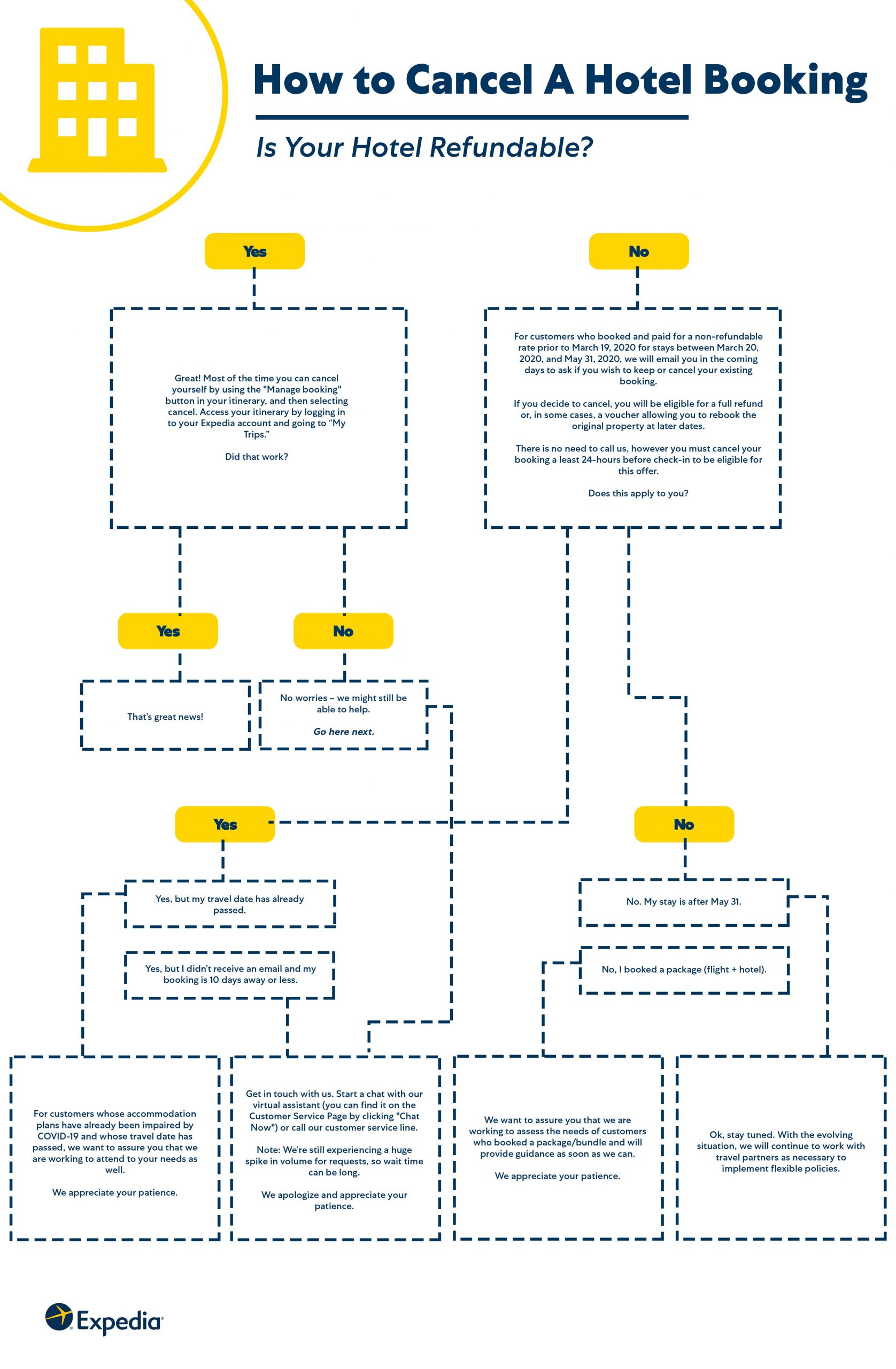
Understanding Your Expedia Reservation Type
Before diving into the cancellation process, it is crucial to recognize that not all hotel bookings are created equal. When you reserve a room through platforms like Expedia Group, the specific rules governing your stay are determined by the individual property, such as the Marriott International or Hilton Worldwide, as well as the promotional rate you selected at checkout.
Refundable Versus Non-Refundable Rates
The single most important factor in canceling a hotel stay is whether you booked a refundable or non-refundable rate.
- Fully Refundable Bookings: These reservations typically allow you to cancel free of charge up until a specific date and time set by the hotel. For example, a property might allow free cancellation up to 48 hours before your scheduled check-in time.
- Non-Refundable Bookings: These rooms are usually offered at a discounted rate precisely because they carry stricter conditions. If you need to cancel a non-refundable booking, you generally will not receive a cash refund. However, some hotels or Travelocity—which shares inventory systems with Expedia—might offer travel credit or future stay vouchers under exceptional circumstances.
Checking the Fine Print
Always review your confirmation email or log into your user dashboard to read the specific cancellation policy before initiating any changes. Pay close attention to time zones, as deadlines are usually enforced based on the local time of the hotel property rather than your home timezone.
Step-by-Step Guide to Canceling Your Hotel on Expedia
When the time comes to officially call off your reservation, the process is designed to be relatively straightforward, whether you prefer using a desktop computer or your mobile device.
Using the Expedia Website
If you are sitting at a computer and want a clear view of your itinerary, follow these steps:
- Navigate to the official Expedia website.
- Sign in to your account using the email address and password associated with the booking. If you booked as a guest, you can access your itinerary by entering your confirmation number and email address via the “Find Itinerary” tool.
- Click on your profile or navigate to the My Trips section.
- Locate the specific hotel stay you wish to cancel and click on it to view the full details.
- Look for the Cancel Booking or Manage Booking button.
- Follow the on-screen prompts. The system will clearly state whether you are eligible for a full refund, a partial refund, or if the booking is non-refundable.
- Confirm the cancellation. Within a few moments, you should receive a cancellation confirmation email containing your refund details, if applicable.
Using the Expedia Mobile App
For travelers on the go, the mobile application provides an equally seamless experience:
- Open the Expedia App on your iOS or Android device.
- Tap on the Trips tab at the bottom of the screen.
- Select the upcoming reservation you need to alter.
- Tap Manage Booking and select Cancel Reservation.
- Review the terms of the cancellation and tap to confirm.
Special Circumstances and Troubleshooting
Sometimes, standard procedures do not cover every unique scenario. You may encounter technical glitches, urgent last-minute changes, or situations where standard policies seem inflexible.
Dealing with Non-Refundable Bookings in Emergencies
If you booked a non-refundable room but face a serious emergency—such as severe illness, natural disasters affecting your destination like Tokyo, or major flight suspensions—do not lose hope.
- Contact Customer Support Directly: Sometimes speaking to a live agent via the virtual chat or phone can yield results that automated systems cannot provide.
- Reach Out to the Hotel: Occasionally, contacting the hotel manager directly at properties like the Ritz-Carlton or an independent boutique lodge can result in a waived fee or a rescheduled stay, as hotels often prefer retaining customer goodwill over strict enforcement.
Refund Timelines and Processing
If your cancellation is successful and qualifies for a refund, patience is required.
- Refunds are typically processed back to the original form of payment used at the time of booking.
- While Expedia usually processes these requests immediately on their end, your financial institution—whether it is Visa, Mastercard, or your personal bank—may take anywhere from 7 to 14 business days to reflect the credit on your statement.
Tips for Hassle-Free Future Bookings
To ensure that your future travel experiences remain stress-free, adopting a few smart booking habits can make a world of difference.
Always Opt for Flexibility When in Doubt
When planning trips far in advance—such as a summer vacation to London or a ski trip to Whistler—always consider paying a slightly higher rate for the refundable option. The peace of mind is almost always worth the nominal price difference.

Keep Your Account Organized
Book all your travel through a single unified account rather than checking out as a guest every time. This ensures all your hotel stays, flights, and car rentals are easily accessible in one place, minimizing confusion and making last-minute adjustments quick and painless. By staying informed and utilizing the tools provided, modifying or canceling your travel plans becomes a simple administrative task rather than a stressful ordeal.
LifeOutOfTheBox is a participant in the Amazon Services LLC Associates Program, an affiliate advertising program designed to provide a means for sites to earn advertising fees by advertising and linking to Amazon.com. Amazon, the Amazon logo, AmazonSupply, and the AmazonSupply logo are trademarks of Amazon.com, Inc. or its affiliates. As an Amazon Associate we earn affiliate commissions from qualifying purchases.