
For the modern traveler, a hotel room is no longer just a place to sleep; it is a temporary home, an office, and an entertainment hub. Whether you are staying at a high-end suite in New York City or a cozy boutique property in London, the ability to stay connected is paramount. For many guests, particularly those traveling for leisure or long-term business, bringing a PlayStation 5 along has become a standard part of the packing process. However, the hospitality industry has historically presented a unique challenge for gamers: the captive portal Wi-Fi system.

Unlike a home network, where you simply enter a password once, hotels like the Marriott International or Hilton Hotels & Resorts utilize login pages that require guests to enter room numbers, last names, or agree to terms of service. This creates a significant hurdle for consoles, which often lack a traditional web browser for this initial authentication. Fortunately, using your smartphone as a bridge is the most effective way to navigate these digital barriers and ensure your gaming session remains uninterrupted during your stay in Paris or Tokyo.
Understanding the Captive Portal Challenge in Hotels
The primary reason connecting a PS5 to hotel internet is difficult lies in the security protocols used by major chains such as InterContinental Hotels Group and Hyatt Hotels. These properties use “Captive Portals.” When a device connects to the Wi-Fi, the network redirects the user to a specific webpage. On a laptop or a smartphone, this page loads automatically. On a gaming console, the system may struggle to trigger this redirect, leaving the PS5 “connected” to the hardware but without actual internet access.
This infrastructure is designed to manage bandwidth and ensure that only registered guests at properties like the Bellagio in Las Vegas can access the network. While it serves the hotel’s administrative needs, it creates a “handshake” problem for the console. By using your phone, you can facilitate this handshake, essentially telling the hotel’s server that your PS5 is a legitimate, authorized device.
The Evolution of Hotel Amenities and Connectivity
In recent years, luxury brands like the Four Seasons Hotels and Resorts and The Ritz-Carlton have begun upgrading their tech stacks to accommodate “BYOD” (Bring Your Own Device) trends. Despite these upgrades, the core issue of authentication remains. Guests staying at an Aman Resorts property expect seamless integration, yet even the most exclusive destinations in Switzerland or the Maldives often utilize these gated Wi-Fi systems to protect guest privacy and maintain network speeds.
The Step-by-Step Guide to Using Your Phone for Authentication
The most direct way to solve the connection issue is through the PlayStation 5’s built-in “How to Authenticate” feature, which is specifically designed to work with smartphones. This method allows the console to generate a bridge that your phone can access to complete the login page requirements.
Phase 1: Initiating the Connection on the Console
- Power on your PS5 in your room at the Sheraton or Westin Hotels.
- Navigate to Settings (the gear icon) in the top right corner.
- Select Network, then choose Settings, and finally Set Up Internet Connection.
- Locate the hotel’s Wi-Fi network from the list of available signals. Note that it will often be labeled with the name of the hotel, such as Fairmont Hotels and Resorts Guest Wi-Fi.
- Once you select the network, the PS5 will attempt to connect. It will likely fail the “Internet Connection” check, but it will successfully connect to the “SSID” (the router).
Phase 2: Bridging with Your Smartphone
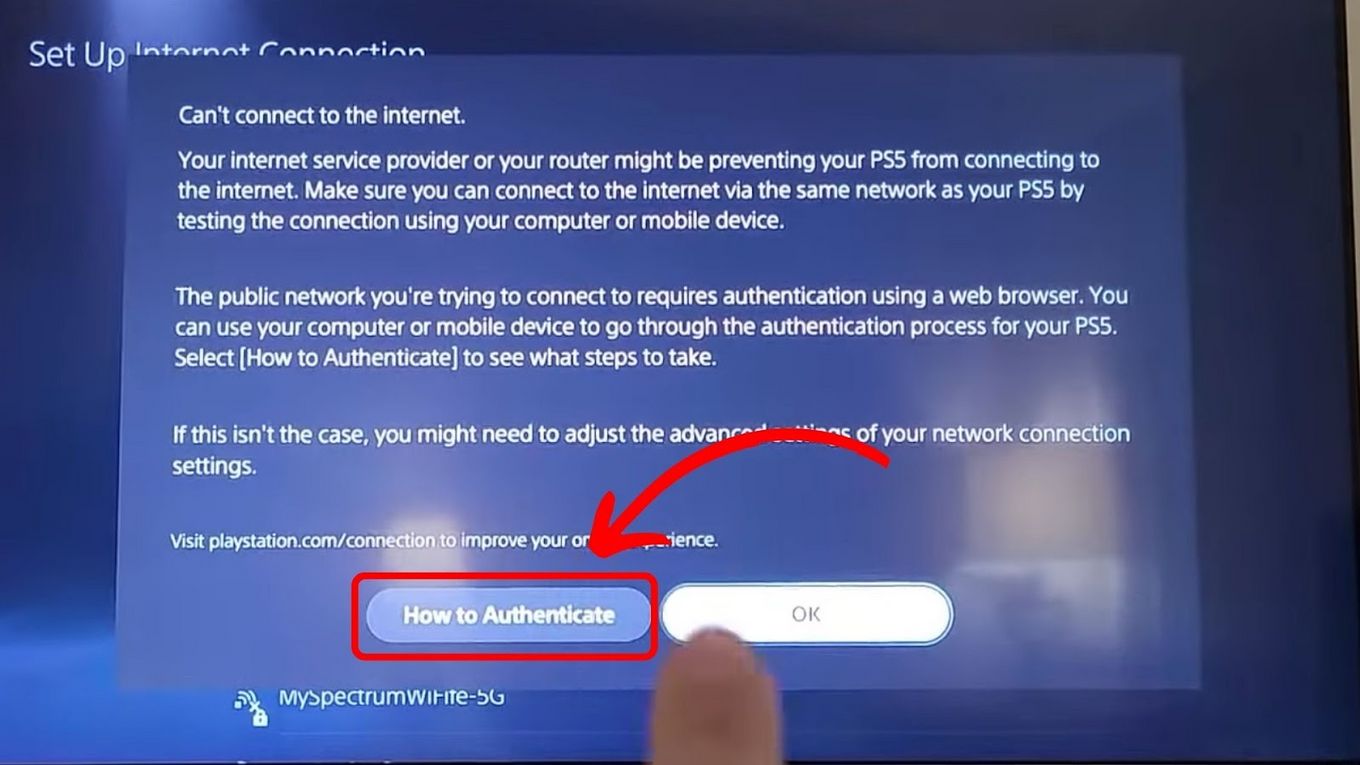
When the connection fails to reach the open internet, a prompt will appear on the PS5 screen asking “How to authenticate.”
- Select the option that says How to use your smartphone to connect to the network.
- A QR code will appear on your television screen.
- Open the camera app on your iPhone or Android device and scan the QR code.
- Your phone will then be redirected to the hotel’s captive portal page (the same one you used to connect your phone earlier).
- On your phone, enter the required credentials—usually your room number at the MGM Grand or a specific code provided by the front desk in Chicago.
- Once the “Success” or “Connected” message appears on your phone, the PS5 will automatically detect the authentication and complete its own connection process.
This method is the cleanest way to connect, as it doesn’t require extra hardware or the use of mobile data. It uses the hotel’s existing infrastructure at properties like Radisson Blu to authorize the console’s MAC address.
Utilizing a Mobile Hotspot for Seamless Gaming
If the captive portal method fails—which can happen in older properties or certain locations in Italy or France where network security is configured differently—the second most effective strategy is the smartphone hotspot.
The Benefits of a Personal Bridge
Using a hotspot is particularly useful if you are staying at a Holiday Inn or Best Western where the Wi-Fi speed might be insufficient for online multiplayer gaming. If your cellular provider offers high-speed 5G in cities like San Francisco or Berlin, your phone’s data might actually be faster than the hotel’s free Wi-Fi tier.
Setting Up the Hotspot Bridge
For guests who want to use the hotel’s Wi-Fi but “share” it through their phone (a feature available on many modern Android devices and some laptops), follow these steps:
- Connect your phone to the hotel Wi-Fi and authenticate as normal.
- Enable “Wi-Fi Sharing” or “Hotspot” in your phone settings. Note: On iPhones, enabling a hotspot usually switches the connection to cellular data, so be mindful of your data limits if you are in Canada or Australia.
- On your PS5, search for your phone’s hotspot name and enter your personal password.
- This bypasses the hotel’s login page entirely because the PS5 is talking to your phone, and your phone has already handled the “security guard” at the hotel’s digital gate.
Optimizing Performance and Troubleshooting in Luxury Accommodations
Even after a successful connection at a premier destination like The Peninsula Paris or Burj Al Arab in Dubai, you might encounter lag or NAT type issues. Most hotel networks are “NAT Type 3” (Strict), which can limit voice chat and matchmaking.
Contacting Guest Services and Technical Support
High-end resorts, such as those within the Mandarin Oriental portfolio, often have a dedicated 24/7 technical support line for their Wi-Fi. If the phone-authentication method fails, you can call the front desk and ask for the “MAC address whitelisting” service.
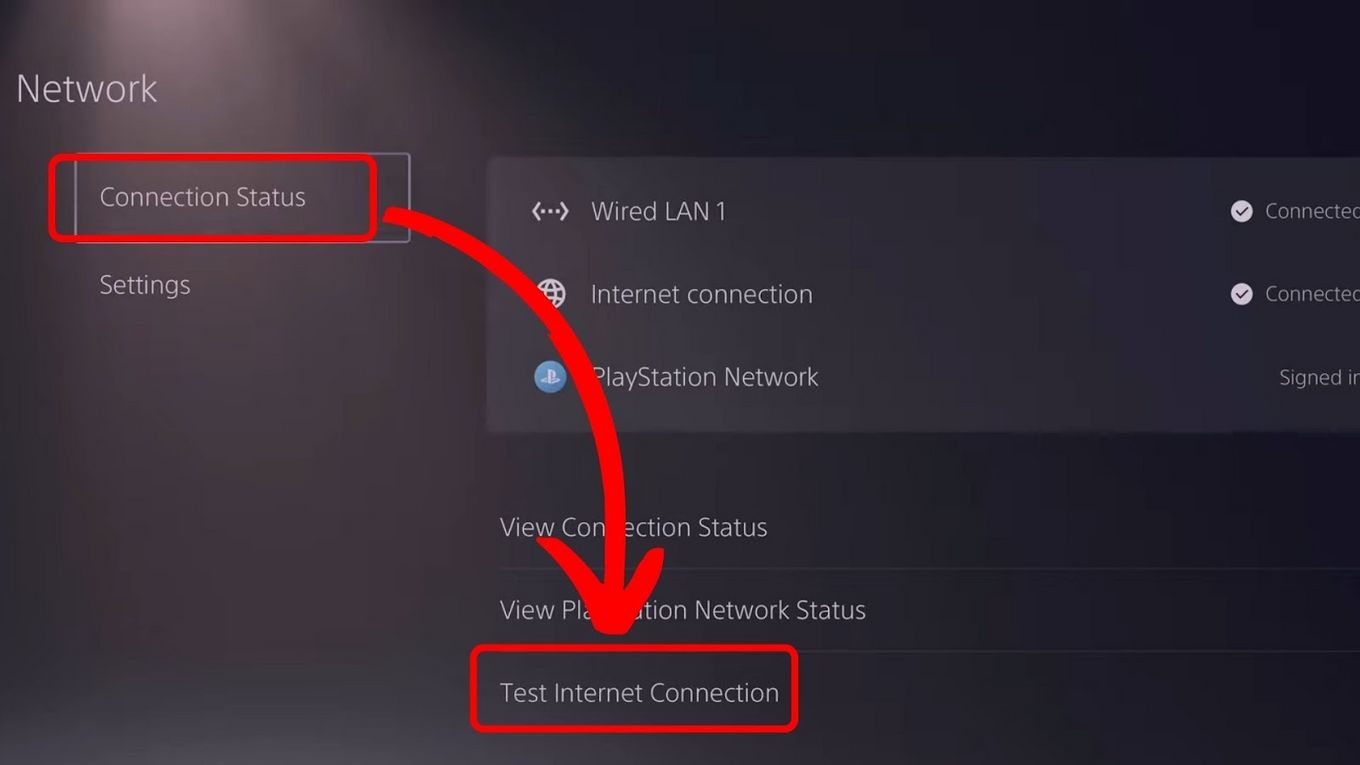
To do this, you will need to provide your PS5’s MAC address, found under Settings > Network > Connection Status > View Connection Status. The IT department at a property like The Waldorf Astoria can manually add your console to their “allowed” list, bypassing the login page for the duration of your stay in Florida or California.
Using Travel Routers for a Permanent Solution
For the frequent traveler who moves between the W Hotels in Singapore and the Shangri-La Hotels and Resorts in Hong Kong, investing in a travel router is a professional-grade alternative. These small devices connect to the hotel Wi-Fi and create a private subnet for all your gadgets. You only have to authenticate the travel router once using your phone, and your PS5, laptop, and tablet will automatically connect to the router without ever seeing a captive portal page again.
Security Considerations for Gaming on the Road
While connecting your PS5 to the internet at a St. Regis Hotels & Resorts property is essential for updating games or playing with friends back in the United States, security should not be overlooked. Public hotel networks are inherently less secure than home networks.
Protecting Your Data
When you use your phone to facilitate a connection at a resort like Atlantis The Palm, ensure that you are not sharing sensitive personal information over the unencrypted hotel signal. While the PlayStation Network (PSN) uses its own encryption for logins, it is always a good practice to use a VPN on your phone during the authentication phase.
Furthermore, if you are staying at a Disney-owned property like the Walt Disney World Resort or a family-centric hotel in Orlando, be aware that bandwidth may be throttled during peak hours (usually 6:00 PM to 10:00 PM). Using your phone to check the network speed before initiating a large game download can save you from a frustrated evening of slow progress bars.
In conclusion, while the architecture of hotel networks at places like The Langham or Sofitel can be complex, the smartphone remains the most versatile tool for bridging the gap. By leveraging the PS5’s internal authentication tools or creating a dedicated hotspot, you can transform any high-end suite into a fully functional gaming station, ensuring that your journey through Europe or Asia includes all the comforts of home.
LifeOutOfTheBox is a participant in the Amazon Services LLC Associates Program, an affiliate advertising program designed to provide a means for sites to earn advertising fees by advertising and linking to Amazon.com. Amazon, the Amazon logo, AmazonSupply, and the AmazonSupply logo are trademarks of Amazon.com, Inc. or its affiliates. As an Amazon Associate we earn affiliate commissions from qualifying purchases.