
In an increasingly connected world, the ability to stay online, even at 35,000 feet, has become a significant consideration for travelers. Whether for business, leisure, or simply to pass the time, in-flight connectivity is a highly sought-after amenity. For passengers flying with Alaska Airlines, the good news is a resounding yes – Alaska Airlines does offer Wi-Fi on the vast majority of its fleet. This commitment to connectivity ensures that travelers can remain productive, entertained, and in touch with the world below, no matter where their journey takes them across the expansive Alaska Airlines network, from the bustling cities of the contiguous United States to the remote beauty of Alaska and the sun-drenched beaches of Hawaii or Mexico.
The airline understands that modern travel is about more than just getting from point A to point B; it’s about making the journey itself a seamless extension of daily life. From checking emails to streaming your favorite shows, or even planning your next adventure, the availability of reliable Wi-Fi transforms the in-flight experience. This comprehensive guide will delve into the specifics of Alaska Airlines’ Wi-Fi service, exploring its features, how to access it, pricing, and how it caters to the diverse needs of today’s traveler, making every flight a more comfortable and connected experience.

Staying Connected Above the Clouds: Alaska Airlines’ Wi-Fi Experience
The airline industry has witnessed a dramatic shift in passenger expectations, with in-flight Wi-Fi moving from a luxury amenity to a near-essential service. Alaska Airlines has kept pace with these demands by equipping its fleet with robust internet solutions. The primary provider for Alaska Airlines’ Wi-Fi has historically been Gogo Inflight Internet, a well-known name in airborne connectivity. While technology continually evolves, ensuring widespread access to this service remains a top priority for the airline.
The goal is to provide a consistent and quality internet experience across their aircraft, which primarily include Boeing 737s and Airbus A320 family aircraft. While the vast majority of the fleet is equipped, it’s always a good idea for travelers to check the specific aircraft type for their flight if connectivity is a critical requirement, though it’s rare to find an Alaska Airlines mainline flight without Wi-Fi today. This commitment reflects the airline’s dedication to enhancing the overall travel journey, aligning with the broader “Travel” and “Lifestyle” themes of modern exploration and efficiency.
The Answer is Yes: Gogo Inflight Internet
For many years, the partnership with Gogo Inflight Internet has been central to Alaska Airlines’ connectivity strategy. Gogo utilizes an air-to-ground system for certain routes, particularly over land, and increasingly, satellite-based technology for a more global and robust connection, especially over water (e.g., flights to Hawaii or transcontinental routes). This hybrid approach allows Alaska Airlines to offer comprehensive coverage across its diverse route map. The service aims to deliver speeds that are adequate for a range of activities, from basic browsing to more demanding applications, depending on the chosen plan.
The integration of Gogo into the Alaska Airlines experience is seamless, allowing passengers to connect almost immediately after reaching cruising altitude. This immediate access minimizes downtime and maximizes the opportunity for passengers to make the most of their flight time, whether it’s catching up on work, connecting with loved ones, or diving into entertainment. The system is designed for user-friendliness, ensuring that even first-time users can navigate the connection process with ease, a critical factor in enhancing the overall “Experiences” aspect of travel.
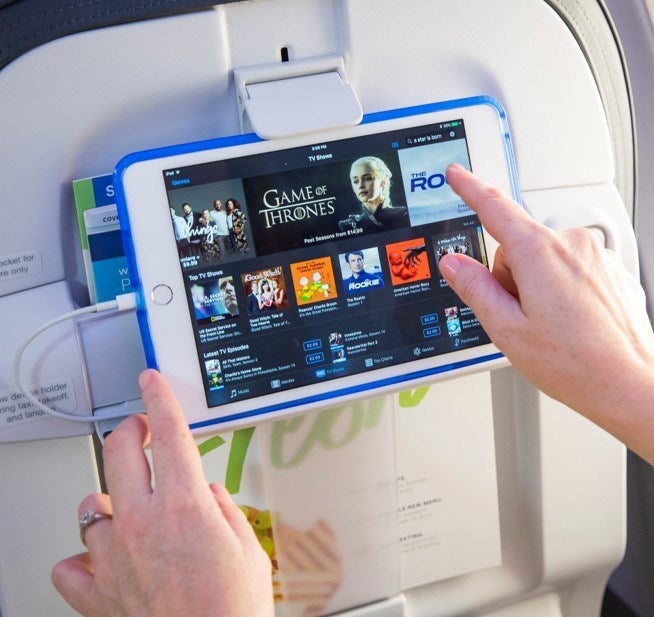
Two Tiers of Connectivity: Stream vs. Basic
To cater to varying passenger needs and budgets, Alaska Airlines, through its Gogo service, typically offers different tiers of Wi-Fi connectivity. While specific offerings can evolve, the general distinction often lies between a “basic” browsing package and a more robust “streaming” package.
The basic connectivity option is usually designed for essential internet activities. This includes checking emails, browsing websites, staying updated on social media platforms like Instagram or Facebook, and using messaging apps like WhatsApp or Skype for text communication. It’s perfect for the “Budget Travel” segment of the “Lifestyle” topic, where travelers want to stay connected without breaking the bank. This tier ensures that business travelers can send urgent emails and casual travelers can stay connected with friends and family without significant delays.
For those requiring more bandwidth, perhaps to indulge in entertainment or conduct more intensive work tasks, the streaming package provides a higher speed and more reliable connection. This tier is engineered to support activities such as watching movies or TV shows on services like Netflix, Hulu, Disney+, or Amazon Prime Video. It’s also suitable for using cloud-based business applications, participating in video calls (though often with reduced quality to manage bandwidth), or engaging in online gaming. This option caters to “Luxury Travel” or “Business Stays” lifestyles, where uninterrupted entertainment or productivity is paramount. The clear distinction between these tiers allows passengers to choose the service that best fits their specific needs for the duration of their flight, optimizing both cost and utility.
How to Access and Utilize Alaska Airlines Wi-Fi
Connecting to Alaska Airlines’ Wi-Fi is designed to be a straightforward process, ensuring that passengers can get online quickly and with minimal hassle. The airline understands that ease of use is paramount, especially when you’re in an unfamiliar environment.
Connecting Made Easy
Once your Alaska Airlines flight reaches cruising altitude (typically above 10,000 feet), the Wi-Fi service becomes active. Here’s a general step-by-step guide to connecting:
- Enable Wi-Fi on Your Device: Turn on Wi-Fi on your smartphone, tablet, or laptop.
- Select the Network: Look for the Wi-Fi network named “gogoinflight” or similar.
- Launch Your Browser: Open a web browser (like Chrome, Safari, Firefox, or Edge). You should be automatically redirected to the Gogo Inflight Internet portal page. If not, type
wifionboard.cominto your browser. - Choose Your Plan: On the portal, you will see the available Wi-Fi plans, typically including the basic and streaming options, along with their respective prices and durations.
- Purchase and Connect: Select the plan that best suits your needs, enter your payment information (credit card or any pre-purchased pass), and follow the on-screen prompts to complete the purchase and establish your connection.
Alaska Airlines often offers free messaging on popular apps, which is a great perk even for those not purchasing a full Wi-Fi package. This allows travelers to send and receive text-based messages on apps like iMessage, WhatsApp, and Facebook Messenger without charge, ensuring a basic level of connectivity for essential communication. This thoughtful inclusion adds significant value, especially for travelers on a “Budget Travel” plan or those simply needing to check in with family.
Understanding Pricing and Plans
The cost of Alaska Airlines’ Wi-Fi can vary based on the duration of your flight, the type of plan you select (basic versus streaming), and any promotions that might be running. Generally, passengers can purchase passes for segments of a flight (e.g., one hour), for the entire flight, or even a monthly subscription if they are frequent flyers on Gogo-equipped airlines.
Typical pricing models might look like this:
- Hourly Pass: A lower-cost option for short bursts of connectivity.
- Flight Pass: Covers the entire duration of a single flight, often offering better value than multiple hourly passes.
- All-Day Pass: Allows connectivity across multiple flights within a 24-hour period (if continuing travel on Gogo-equipped aircraft).
- Monthly Subscription: Geared towards frequent flyers, offering unlimited access on Gogo-equipped flights for a fixed monthly fee.
Prices can range from approximately $7 for an hour of basic access to $19-$25 for a full-flight streaming pass, with monthly subscriptions often falling in the $49-$60 range. These figures are illustrative and subject to change. It’s advisable to check the most current pricing on the Gogo portal once onboard your flight. For business travelers, many companies cover the cost of in-flight Wi-Fi as a legitimate business expense, enhancing productivity during “Business Stays.” For leisure travelers, weighing the cost against the desire to stream content or stay connected with friends sharing “Experiences” is a common decision point.
The Value of In-Flight Connectivity for Every Traveler
The availability of Wi-Fi on Alaska Airlines transcends mere convenience; it fundamentally reshapes the in-flight experience, offering significant value to a diverse range of travelers. From maximizing productivity during “Business Stays” to enriching “Family Trips” and empowering independent exploration, connectivity is a cornerstone of modern travel “Lifestyle.”
Enhancing Business Travel and Productivity
For the business traveler, a flight often represents valuable, uninterrupted work time. Alaska Airlines’ Wi-Fi transforms the cabin into a mobile office. Professionals can seamlessly check and respond to emails, access cloud-based documents, participate in virtual meetings (albeit often with audio focus rather than video for bandwidth considerations), and collaborate with colleagues using platforms like Microsoft Teams or Zoom. This capability allows them to land at their destination, whether it’s Seattle, Portland, Los Angeles, or New York, with a reduced backlog of work, ensuring they are ready for client meetings or presentations. The ability to stay productive while airborne contributes directly to efficiency and reduces stress, making “Business Stays” more effective and less disruptive to work schedules.
Furthermore, being connected means business travelers can monitor market trends, make last-minute booking changes for “Hotels” or “Accommodation,” or review meeting agendas without delay. It’s an invaluable tool for staying agile and responsive in today’s fast-paced corporate environment, blurring the lines between the office and the sky.
Elevating Leisure and Family Journeys
Leisure travelers and families also reap immense benefits from in-flight Wi-Fi. For individuals, the ability to stream movies, listen to music, read e-books, or browse social media transforms long flights into enjoyable extensions of their relaxation time. It eliminates boredom and provides personalized entertainment on demand.
For “Family Trips,” Wi-Fi can be a game-changer. Parents can keep children entertained with educational apps or streaming kids’ shows, significantly reducing in-flight stress for everyone. Teenagers can stay connected with friends, sharing their journey “Experiences” in real-time. This connectivity allows families to arrive at their “Destinations” refreshed and happy, ready to explore “Attractions” and “Landmarks.” It also enables planning on the go – looking up local “Food” options in San Francisco, researching “Activities” in Costa Rica, or reading “Reviews” for a resort in Hawaii. The ease of accessing “Travel Guides” and “Tourism” tips mid-flight ensures a smoother transition from air to ground and a richer overall vacation experience.
Planning Your Adventure with Onboard Wi-Fi
Beyond work and entertainment, Wi-Fi on Alaska Airlines empowers travelers to proactively manage and enhance their trips. Imagine flying into a new city and using your flight time to finalize your itinerary:
- Booking and Accommodation: Confirming hotel reservations, checking into “Apartments” or “Villas,” or even making last-minute bookings for “Suites” or “Resorts” if plans change. Travelers can compare “Accommodation” options, read “Reviews,” and secure their stay before landing.
- Tourism and Local Culture: Researching local “Landmarks” like the Space Needle in Seattle or historical sites in Mexico, understanding local “Culture,” finding the best “Food” spots, or identifying unique “Activities” to try. The Wi-Fi allows immediate access to maps, translation apps, and comprehensive travel guides.
- Logistics and Ground Transportation: Checking airport transfer options, booking ride-shares, or understanding public transit routes in an unfamiliar “Destination.” This proactive planning reduces anxiety and ensures a smooth arrival, making the most of precious travel time.
By providing connectivity, Alaska Airlines facilitates a holistic travel experience, supporting everything from the initial “Booking” to experiencing the local “Lifestyle” upon arrival.
Tips for Optimizing Your Alaska Airlines Wi-Fi Experience
While in-flight Wi-Fi is a fantastic amenity, managing expectations and employing a few best practices can significantly enhance your experience with Alaska Airlines’ service. Understanding the nuances of airborne connectivity can help you get the most out of your purchased plan.
Best Practices for a Seamless Connection
To ensure you have the best possible Wi-Fi experience on your Alaska Airlines flight, consider these tips:
- Purchase in Advance (if available): Sometimes, Gogo offers the option to purchase Wi-Fi passes before your flight, potentially at a discounted rate or as part of a bundle. Always check the Alaska Airlines website or your booking details.
- Download Before You Fly: For heavy data activities like streaming movies or downloading large files, it’s always best to download content to your device before you board. While streaming is often possible with the premium plan, it’s subject to network capacity, and pre-downloaded content guarantees uninterrupted entertainment.
- Manage Background Apps: Many applications on your devices consume bandwidth in the background. Close unnecessary apps, disable automatic updates, and pause cloud syncing to free up bandwidth for your primary use. This is particularly crucial on a “Budget Travel” plan where bandwidth is limited.
- Connect One Device: While you might have multiple devices, connecting just one at a time (e.g., your laptop for work, or a tablet for entertainment) will typically provide a more stable and faster connection.
- Utilize Free Messaging: Remember that Alaska Airlines often offers free messaging on selected apps. If your primary need is basic communication, take advantage of this complimentary service to save money and bandwidth.
- Avoid Video Calls (where possible): While some Wi-Fi plans might support video calls, the quality can be inconsistent, and they consume significant bandwidth, potentially slowing down the network for everyone. Prioritize audio calls or text-based communication for business or personal “Tips.”
- Check for Promotions: Keep an eye out for special offers or partnerships. Sometimes, certain credit cards or loyalty programs might offer free or discounted Wi-Fi access.
By following these simple “Tips,” travelers can optimize their in-flight connectivity, making their “Experiences” with Alaska Airlines’ Wi-Fi as smooth and efficient as possible.
Troubleshooting Common Issues
Even with the best technology, occasional hiccups can occur with in-flight Wi-Fi. If you encounter issues, here are some common troubleshooting steps:
- Reconnect to the Network: Sometimes, simply disconnecting and reconnecting to the “gogoinflight” Wi-Fi network can resolve minor glitches.
- Restart Your Device: A quick restart of your phone, tablet, or laptop can often clear up connectivity issues.
- Clear Browser Cache: If you’re having trouble loading the portal page, clear your web browser’s cache and cookies, or try a different browser.
- Check Flight Altitude: Ensure the aircraft has reached cruising altitude. Wi-Fi service is typically unavailable during taxi, takeoff, and landing.
- Contact Support: If problems persist, the Gogo portal usually has a customer support link or FAQ section. While there isn’t always dedicated on-board support for Wi-Fi, contacting them after your flight with your flight details can help if issues relate to payment or a service outage.
- Patience is Key: In-flight Wi-Fi is a shared resource, and speeds can fluctuate based on the number of users and the aircraft’s position relative to ground towers or satellites. Periods of high demand might naturally lead to slower speeds.
Understanding these points can help manage expectations and resolve minor issues, ensuring your “Travel” plans remain on track and your “Lifestyle” stays connected.
The Future of Connectivity on Alaska Airlines
The landscape of in-flight connectivity is continuously evolving, and Alaska Airlines is committed to staying at the forefront of these advancements. As passenger expectations for seamless, high-speed internet grow, airlines are investing in next-generation technologies to deliver an experience that mirrors ground-based broadband. This commitment aligns perfectly with the “Lifestyle” aspect of travel, where staying connected is not just a preference but an integral part of daily life.
Continuous Improvements and Innovation
Alaska Airlines actively monitors and evaluates new Wi-Fi technologies to enhance its onboard service. While Gogo Inflight Internet has been a reliable partner, the industry is seeing rapid innovation from other providers like Viasat and Hughes, offering satellite-based systems capable of delivering significantly faster speeds and greater bandwidth. These systems are designed to support a higher number of simultaneous users engaging in data-intensive activities, including truly high-definition streaming and more robust video conferencing.
The trend is moving towards:
- Higher Speeds: Providing internet speeds comparable to what passengers experience at home or in “Hotels.” This means smoother streaming, quicker downloads, and more responsive browsing.
- Increased Bandwidth: Allowing more passengers to use the Wi-Fi simultaneously without experiencing significant slowdowns, crucial for “Family Trips” where multiple devices might be in use.
- Enhanced Coverage: Leveraging advanced satellite networks to provide consistent connectivity over oceans and remote “Destinations,” ensuring that flights to Hawaii or Mexico have the same quality of service as domestic routes.
- Simplified Pricing: Potentially moving towards more straightforward, inclusive pricing models or even offering free basic Wi-Fi for all passengers, a growing trend among some carriers.
These continuous improvements aim to make in-flight Wi-Fi not just an amenity but an integral, high-quality component of the entire Alaska Airlines journey. The goal is to facilitate remote work for “Business Stays,” enable immersive entertainment for leisure travelers, and empower everyone to plan their “Tourism” adventures or share their “Experiences” without interruption, solidifying Alaska Airlines’ reputation as a forward-thinking carrier dedicated to passenger comfort and convenience.
In conclusion, yes, Alaska Airlines offers Wi-Fi, and it’s a valuable tool that significantly enhances the modern air travel experience. By understanding the available options, prices, and best practices, passengers can stay connected, entertained, and productive, making their journey above the clouds as enjoyable and efficient as possible. As technology continues to advance, we can anticipate even faster and more seamless connectivity on future Alaska Airlines flights, further blurring the lines between ground and air.