
Navigating the logistics of modern travel often involves unexpected changes of plans. Whether an important business meeting in New York City gets postponed, a family vacation in Maui requires rescheduling, or a weekend getaway to Paris faces weather disruptions, knowing how to manage your bookings efficiently is essential. When you have reserved your lodging through online travel agencies like Expedia, the cancellation process is usually streamlined, provided you understand the specific terms, timelines, and digital steps required. This comprehensive guide details everything you need to know about successfully canceling a hotel room through Expedia, helping you secure refunds and avoid unnecessary fees.
Understanding Expedia’s Cancellation Policies and Hotel Rules
Before initiating any cancellation request, it is critical to recognize that Expedia acts as a middleman between the traveler and the property management. Consequently, the refundability of your reservation depends heavily on the specific policy set by the hotel you booked, whether it is a global brand like Marriott International or an independent boutique stay.
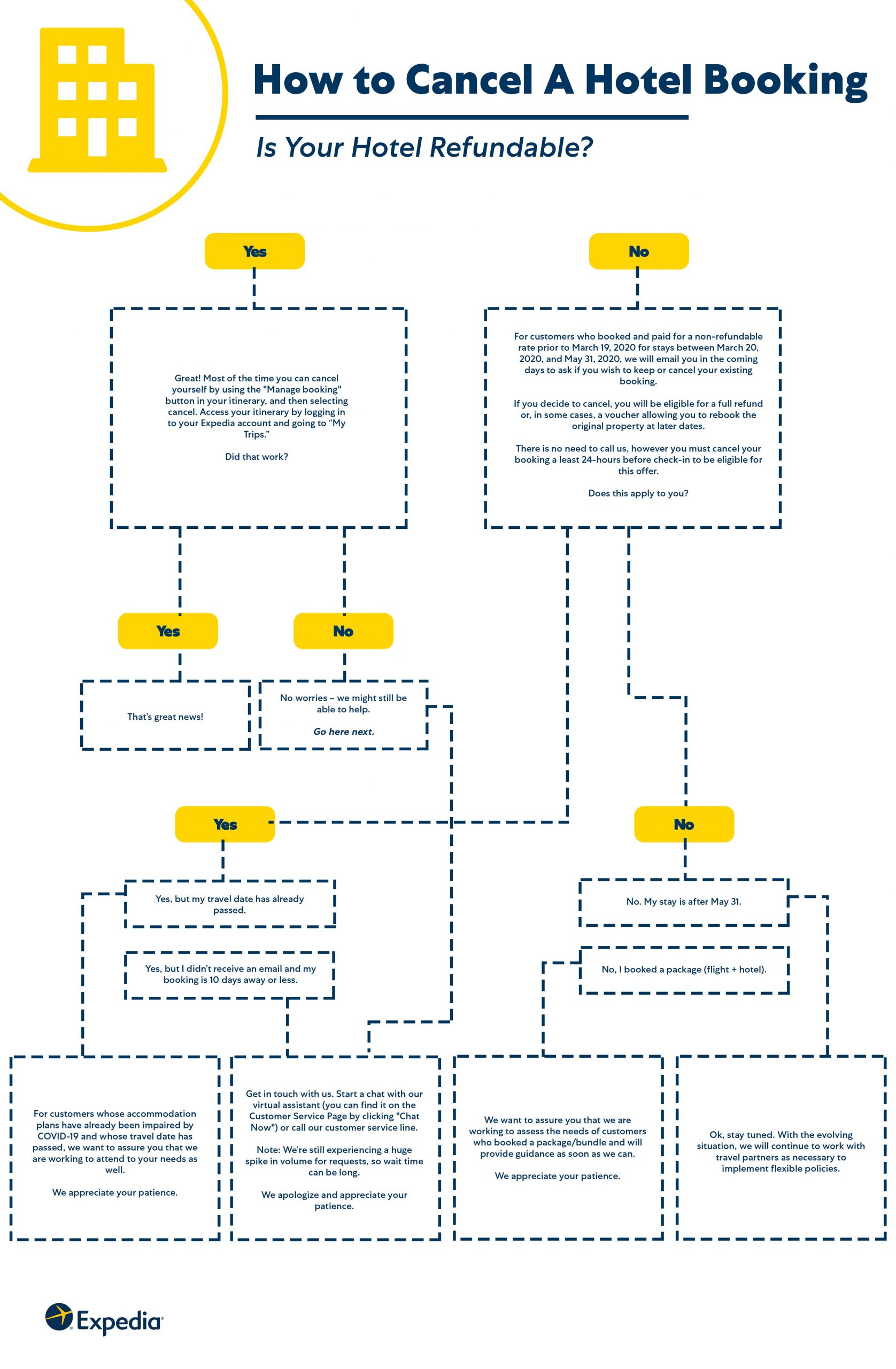
Refundable Versus Non-Refundable Bookings
When browsing properties in destinations like London or Tokyo via Expedia, you will typically encounter two primary types of room rates:
- Fully Refundable Rates: These bookings allow you to cancel your reservation up to a specified deadline—often 24 to 48 hours before check-in—without incurring any financial penalty.
- Non-Refundable Rates: Offered at a discounted price, these bookings are strictly locked in from the moment of payment. If you cancel, you generally forfeit the entire amount, though occasional exceptions are made during widespread travel advisories or natural disasters.
Pay Now Versus Pay Later Options
Another factor influencing your cancellation is how you chose to pay during the initial checkout process on Expedia. If you selected the “Pay Later” option, you reserved the room using a credit card to guarantee the booking, but no charges were made until you arrived at the property. Canceling a “Pay Later” reservation typically involves simply releasing the guarantee. Conversely, “Pay Now” bookings mean Expedia collected the funds immediately, meaning your cancellation will trigger a refund process back to your original payment method.
Step-by-Step Guide to Canceling Your Reservation Online
The most direct and efficient way to cancel a hotel stay booked through Expedia is by utilizing their website or mobile application. The digital dashboard provides instant visibility into your itinerary status.
Accessing Your Itinerary
- Navigate to the official Expedia homepage or open the mobile application on your smartphone.
- Sign in to your account using the email address and password associated with the booking. If you booked as a guest, locate your confirmation email to retrieve your itinerary number.
- Click on the “Trips” or “My Trips” section, typically located in the top right corner of the desktop interface.
- Locate the specific hotel reservation you wish to modify or cancel. Properties located in bustling hubs like Las Vegas or Rome will be clearly listed with their respective check-in dates.
Executing the Cancellation
Once you have opened the correct itinerary details, follow these actions:
- Look for the button labeled “Cancel Booking” or “Manage Booking.”
- Review the on-screen prompt detailing any potential cancellation fees, refund amounts, and deadlines. Expedia will explicitly state whether you are within the penalty-free window.
- Confirm your decision by clicking “Cancel This Reservation.”
- Within a few minutes, you should receive a cancellation confirmation email detailing the refund breakdown. Keep this email for your records, especially if you are waiting for funds to return to your credit card.
Alternative Methods to Cancel Your Expedia Hotel Booking
While managing your reservation digitally is preferred, technical glitches, forgotten passwords, or urgent timelines may require alternative approaches.
Contacting Expedia Customer Service
If you encounter issues while attempting to cancel online—such as an error message or a booking that appears locked—speaking directly with a customer support representative is your best course of action.
- Phone Support: Expedia offers 24/7 customer service phone lines globally. Be prepared to provide your itinerary number, the name under which the reservation was made, and the email address used during checkout.
- Live Chat: The virtual agent and live chat feature available on the Expedia help center can handle standard cancellation requests quickly without requiring you to wait on hold.
Contacting the Hotel Directly
In urgent situations—such as a flight cancellation stranding you at an airport in Chicago or Miami on the day of check-in—you can contact the hotel front desk directly. While third-party bookings usually require Expedia to process financial adjustments, hotel managers occasionally possess the authority to waive cancellation penalties or authorize late modifications in extraordinary circumstances. Always request the name of the staff member who assists you and ask for written confirmation of any verbal agreements.
What to Expect Regarding Refunds and Processing Times
Once your hotel cancellation is successfully processed through Expedia, understanding the financial aftermath helps prevent unnecessary anxiety.
Refund Timelines for PrePaid Bookings
If your canceled room was a “Pay Now” reservation, Expedia immediately initiates the refund process with the hotel and payment processor. However, the time it takes for the funds to reflect on your statement depends entirely on your financial institution. Typically, credit card refunds take between 7 to 10 business days, though some international banks or debit cards may require up to two billing cycles.

Dealing with Non-Refundable Situations and Travel Insurance
If you missed the cancellation window or booked a strictly non-refundable rate for a trip to a destination like Cancun, standard policy dictates that no refund will be issued. Nevertheless, you have a few potential avenues to explore:
- Travel Insurance Claims: If you purchased a comprehensive travel protection plan either through Expedia or an independent provider, unforeseen events such as severe illness, jury duty, or family emergencies may be covered. File a claim with your insurer, attaching the cancellation confirmation and supporting medical or legal documentation.
- Hotel Credit Requests: Occasionally, if you speak politely with the hotel management, they may offer a future stay credit or voucher instead of a cash refund, allowing you to salvage the value of your booking for a later date.