
Navigating the digital landscape of modern media often involves a subscription model, and for many, The New York Times has been a cornerstone of their daily information intake. However, as needs evolve and priorities shift, the decision to cancel a subscription is a common one. This guide is designed to provide a clear, step-by-step process for discontinuing your New York Times digital or print subscription, ensuring a hassle-free experience. Whether you’re looking to save money, reduce digital clutter, or simply no longer find value in the service, understanding the cancellation procedure is key. We will explore the various methods available, from online portals to direct customer service, and offer tips to make the process as smooth as possible.
Understanding Your Subscription and Cancellation Options
Before initiating the cancellation process, it’s beneficial to have a clear understanding of your current subscription details. This includes knowing your subscription type (digital-only, digital + print, specific sections), your billing cycle, and your account information. Familiarizing yourself with The New York Times‘s subscription policies can also help prevent any unexpected charges or complications.
Locating Your Subscription Information
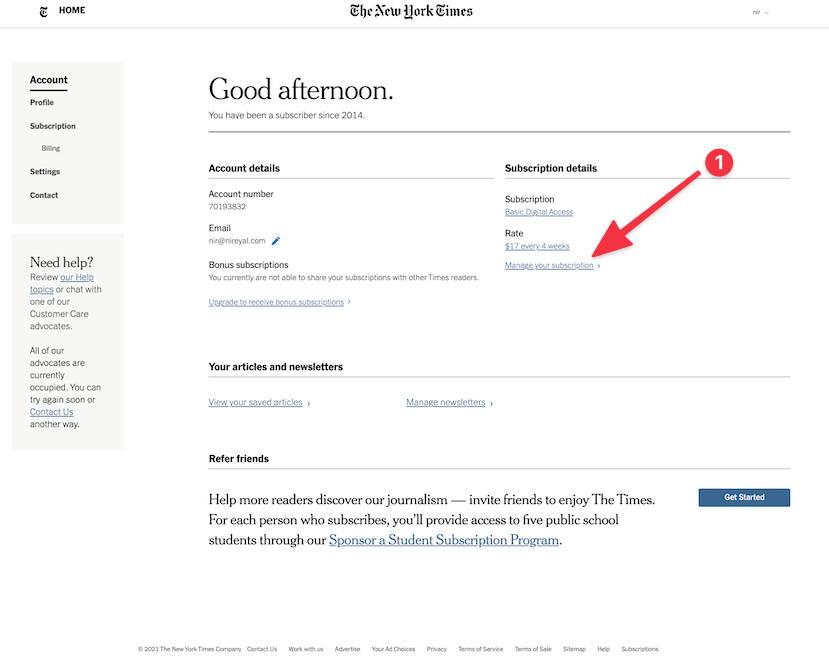
The first step in canceling your subscription is to locate your account details. This typically involves logging into your New York Times account on their official website. Once logged in, navigate to the “Account Settings,” “Subscription Management,” or a similar section. Here, you should find all the pertinent information about your active subscription, including the type of plan you are enrolled in, the renewal date, and the billing method. If you are unsure of your login credentials, the website usually provides a “forgot password” or “forgot username” option to assist you.
Reviewing Subscription Terms and Conditions
While The New York Times generally offers a straightforward cancellation policy, it’s always wise to review the specific terms and conditions associated with your subscription. This can usually be found in the FAQ section of their website or within the original subscription agreement. Pay close attention to any clauses regarding refunds, early termination fees, or notice periods required before cancellation. Understanding these terms will ensure you are fully informed and can avoid any potential discrepancies. Most digital subscriptions can be canceled at any time, and you will typically retain access until the end of your current billing period.
Methods for Canceling Your New York Times Subscription
The New York Times offers several convenient methods for subscribers to cancel their service. The most common and often the quickest way is through their online platform, but direct contact with customer service is also a viable option, especially if you encounter any issues or prefer speaking with a representative.
Online Cancellation via Your Account Portal
The most efficient method for canceling your subscription is typically through your online account.
- Log In: Go to the official New York Times website and log in to your account using your registered email address and password.
- Navigate to Subscription Settings: Once logged in, look for an option such as “My Account,” “Subscription,” or “Account Settings.” The exact wording may vary.
- Find the Cancellation Option: Within your account management section, you should see an option to “Manage Subscription,” “Cancel Subscription,” or “Turn Off Auto-Renewal.” Click on this option.
- Follow Prompts: The system will likely guide you through a series of steps. This may involve confirming your decision, providing a reason for cancellation (often optional but can help The New York Times improve its services), and acknowledging the end date of your current billing cycle.
- Confirmation: After completing the steps, you should receive an on-screen confirmation and likely an email confirming the cancellation of your subscription. It is advisable to save this confirmation for your records.
Contacting Customer Service

If you prefer to speak with a representative or encounter difficulties with the online cancellation process, contacting The New York Times‘s customer service is the next best approach.
- Find Contact Information: Visit the “Help” or “Contact Us” section of The New York Times website. Here you will find phone numbers, email addresses, or a live chat option.
- Phone Support: Calling customer service can often lead to immediate resolution. Have your account number or the email address associated with your subscription ready. Be prepared to navigate an automated phone system before reaching a live agent.
- Email Support: If you opt for email, clearly state your intention to cancel your subscription in the subject line and body of the email. Include all relevant account information to expedite the process.
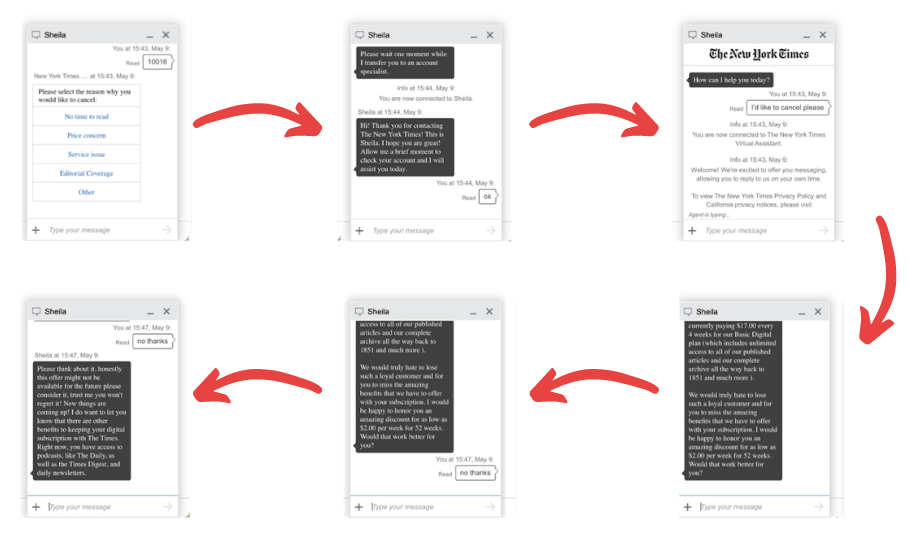
- Live Chat: Many services offer a live chat feature, which can be a quick way to get assistance without waiting on hold. This is often found in the “Help” or “Contact Us” section of the website.
When contacting customer service, be polite but firm in your request to cancel. They may offer retention deals or discounts to encourage you to stay subscribed; politely decline if your decision to cancel is final.
Post-Cancellation Steps and Considerations
Once you have successfully canceled your subscription, there are a few final steps and considerations to ensure a clean break and to manage any lingering digital access.
Verifying Cancellation and Access End Date
After initiating the cancellation, it’s crucial to verify that it has been processed correctly.
- Check Your Email: Look for a confirmation email from The New York Times stating that your subscription has been canceled. This email usually details the effective date of cancellation.
- Review Account Status: Log back into your New York Times account a day or two after initiating the cancellation to ensure that your subscription status has been updated to “canceled” or “expired.”
- Note End of Access: The confirmation email or your account dashboard should indicate the exact date your access to the subscription content will end. You will typically retain access until the end of your current paid billing period.
Managing Billing and Future Charges
Understanding how billing works post-cancellation is important to avoid any unwanted charges.
- Billing Cycle Awareness: Be aware of your current billing cycle’s end date. Most subscriptions allow access until this date, even after cancellation. This means you won’t be charged for the next period if you cancel before it begins.
- Credit Card Statements: Keep an eye on your credit card or bank statements for the next few billing cycles. If you see any unauthorized charges from The New York Times, contact your bank or credit card company immediately to dispute them and inform The New York Times customer service.
- Refund Policy: If your subscription terms allow for prorated refunds or if you believe you are entitled to a refund based on the terms of service, inquire about this during the cancellation process or by contacting customer service.
Considering Alternatives and Future Subscriptions
While canceling your New York Times subscription, you might consider alternative news sources or re-evaluate your information consumption habits.
- Alternative News Sources: Explore other reputable news organizations, both digital and print, that might better suit your current needs and budget. This could include local newspapers, specialized publications, or even free news aggregators.
- Re-subscribing in the Future: If your needs change or if The New York Times introduces new features or pricing that appeal to you, you can always resubscribe in the future. Many publications offer introductory deals for returning subscribers.
- Digital Detox: Canceling subscriptions can be part of a broader effort to reduce digital distractions and focus on more essential information sources. Consider how you consume news and whether a more curated approach might be beneficial.
By following these steps, you can effectively and confidently cancel your New York Times subscription, ensuring a smooth transition and peace of mind.
LifeOutOfTheBox is a participant in the Amazon Services LLC Associates Program, an affiliate advertising program designed to provide a means for sites to earn advertising fees by advertising and linking to Amazon.com. Amazon, the Amazon logo, AmazonSupply, and the AmazonSupply logo are trademarks of Amazon.com, Inc. or its affiliates. As an Amazon Associate we earn affiliate commissions from qualifying purchases.