In an age where information is abundant and easily accessible, managing your digital subscriptions has become a key aspect of personal finance and lifestyle optimization. The New York Times, a venerable institution known for its in-depth journalism and comprehensive coverage, is a cherished resource for many. However, for a variety of reasons—ranging from shifting financial priorities and evolving news consumption habits to, increasingly, significant lifestyle changes involving travel and new experiences—subscribers may find themselves needing to cancel their membership.
Whether you’re embarking on a long-term adventure through Southeast Asia, planning a sabbatical exploring the historical sites of Europe, relocating for work to a bustling metropolis like Singapore, or simply aiming for a digital detox while unwinding at a luxurious resort in the Maldives, your relationship with daily news can change dramatically. This guide is designed to provide a clear, concise, and comprehensive walkthrough on how to cancel your New York Times subscription, ensuring a smooth transition regardless of your underlying reasons. We’ll cover everything from understanding your subscription type to navigating the online and phone cancellation processes, and what to expect post-cancellation.
Understanding Your Subscription and Why Cancellation Might Be The Right Choice
Before you initiate the cancellation process, it’s beneficial to understand the specifics of your current New York Times subscription. The publication offers a range of subscription tiers, including Digital Access, All Access (which often bundles games and cooking content), and various print delivery options. Each might have slightly different terms, though the cancellation methods generally remain consistent. Knowing what you’re subscribed to will help you articulate your needs to customer service, if necessary, and better understand any retention offers you might receive.
The decision to cancel a subscription is often multifaceted, moving beyond simple cost-cutting. While budget constraints are a common driver, many subscribers choose to cancel due to more profound shifts in their lifestyle or priorities.
Common Reasons for Cancellation Beyond Budget
The modern traveler and digital nomad often finds their media consumption habits evolving rapidly. Here are some key lifestyle and travel-related reasons why canceling your New York Times subscription might be the right move:
- Extensive Travel and Disconnection: When you’re busy exploring the vibrant markets of Thailand, hiking through the majestic Alps in Switzerland, or immersing yourself in the rich culture of Japan, your focus naturally shifts away from daily news cycles. Long-term travel, extended vacations, or even short, intense trips can lead to a desire for a digital detox. Many travelers prefer to absorb local information through direct experience and local interactions, rather than global headlines, especially when time zone differences make real-time engagement with US-centric news challenging. The peace of mind that comes from disconnecting can be a powerful motivator to shed non-essential digital commitments.
- Information Overload and Shifting Interests: In an era of constant news updates, many individuals feel overwhelmed by the sheer volume of information. A desire to streamline daily intake, focus on mental well-being, or prioritize niche content (such as travel blogs, specialized industry news, or local news in a new city like Berlin or Sydney) can lead subscribers to reassess their general news subscriptions. As your interests gravitate towards discovering the best accommodation options in Portugal or planning a multi-country tour across South America, the broad coverage of a national newspaper might become less relevant to your immediate informational needs.
- Relocation or Change in Residency: Moving to a new country like Canada or even a different state within the United States can significantly alter your news consumption patterns. While the New York Times offers international coverage, many expatriates or new residents prefer to subscribe to local news sources that provide deeper insights into their immediate environment. The logistics of print delivery for a print subscription also become complicated or impossible when moving internationally, making cancellation a practical necessity.
- Focus on Experiential Learning: For those who prioritize hands-on experiences and cultural immersion, the time spent reading digital news might be better allocated to exploring local landmarks, participating in community events, or simply enjoying the serenity of a new destination. Instead of reading about current events, you might be busy experiencing them first-hand, whether that’s wandering through the ancient streets of Rome or marveling at the architecture in Paris.
Recognizing these evolving needs is the first step. Once you’re clear on why you want to cancel, the process itself becomes much more straightforward.
Navigating the Online Cancellation Process
For most digital subscribers, canceling your New York Times subscription online is the quickest and most convenient method. The website interface is designed to be user-friendly, although it does involve a few steps to ensure you’ve considered all options.
Step-by-Step Guide for Web Cancellation
Follow these instructions carefully to cancel your subscription directly through the New York Times website:
- Access Your Account: Open your web browser and navigate to the official New York Times website (nytimes.com). Log in to your account using your registered email address and password. If you’ve forgotten your login details, use the “Forgot Password” link to reset them.
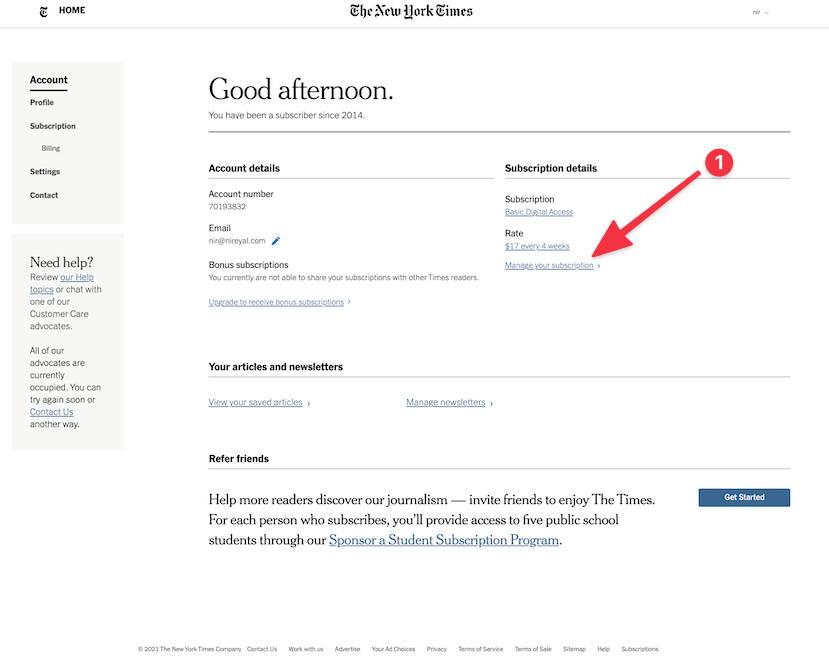
- Navigate to “My Account”: Once logged in, click on your username or profile icon, usually located in the top right corner of the homepage. From the dropdown menu, select “My Account” or “Account Settings.” This section serves as your personal dashboard for managing all aspects of your subscription.
- Find “Manage Subscription”: Within the “My Account” area, look for a section or link titled “Manage Subscription,” “Subscription Details,” or similar. This is where you’ll find information about your current plan, billing history, and options for making changes.
- Initiate Cancellation: On the “Manage Subscription” page, scroll down or look for a prominent link or button that says “Cancel Subscription,” “Cancel My Subscription,” or “Stop My Subscription.” The exact wording might vary slightly. Click this option to begin the cancellation flow.
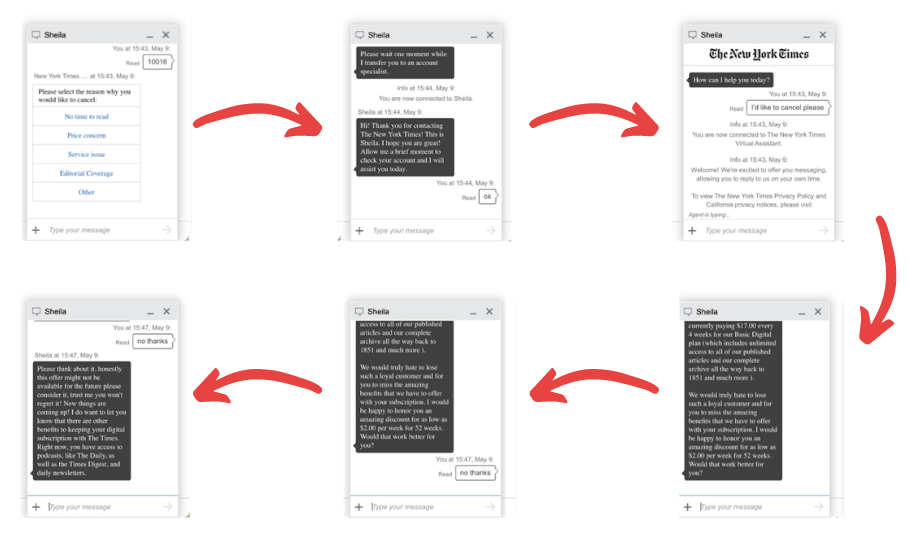
- Follow the Prompts and Decline Offers: The New York Times (like many subscription services) will typically present you with a series of questions about your reason for canceling. Be prepared to select an option (e.g., “cost,” “not using enough,” “changing interests,” or, if applicable, “traveling/relocating”). After selecting your reason, you will likely be presented with retention offers. These often include discounted rates for a few months, alternative subscription packages, or even free periods to encourage you to stay. Politely decline these offers if you are committed to canceling. For example, if you’re planning an extended trip to Mexico and know you won’t be reading, a temporary discount might not be enough to sway you.
- Confirm Cancellation: After navigating through any retention attempts, you will reach a final confirmation screen. Read the details carefully to ensure you understand when your access will end. Click the final “Confirm Cancellation” or “Complete Cancellation” button. You should receive an immediate on-screen confirmation and, usually, a follow-up email confirming the cancellation.
Important Notes for Online Users
- App Store Subscriptions: If you originally subscribed to the New York Times through a third-party app store, such as the Apple App Store or Google Play Store, you must cancel through those platforms, not directly on the NYT website.
- For Apple App Store: Go to your device’s “Settings” > Tap your name (Apple ID) > “Subscriptions” > Find and select your New York Times subscription > “Cancel Subscription.”
- For Google Play Store: Open the Google Play Store app > Tap your profile icon > “Payments & subscriptions” > “Subscriptions” > Find and select your New York Times subscription > “Cancel subscription.”
- Keep Records: Always save any confirmation emails or screenshots of the cancellation process for your records. This is especially useful if any billing discrepancies arise later.
Cancelling by Phone: Personal Support and Retention Offers
While online cancellation is often the quickest, some subscribers, particularly those with print subscriptions or complex account issues, may prefer to speak with a customer service representative. Cancelling by phone also provides an opportunity for direct negotiation regarding retention offers, which might be particularly appealing if your reason for canceling is temporary, like a short-term relocation to New York City before a longer journey.
The Phone Cancellation Experience
Here’s what to expect when canceling your New York Times subscription over the phone:
- Locate the Customer Service Number: The primary customer service number for the New York Times in the United States is typically (800) NYTIMES or (800) 698-4637. You can find up-to-date contact information on their official “Contact Us” page on the website. Be mindful of their operating hours to avoid long wait times.
- Prepare Account Information: Before calling, have your account number (if you have one), the email address associated with your subscription, and any relevant billing information ready. This will help the representative quickly locate your account.
- State Your Intention Clearly: Once connected, clearly state that you wish to cancel your New York Times subscription. You will likely be asked for your reason. Be honest and concise. For instance, explaining that you’re moving abroad, embarking on extensive travels, or simply reducing your digital footprint can be a perfectly valid and understandable reason.
- Handle Retention Offers: Expect the customer service representative to present you with various retention offers. These are designed to keep you as a subscriber and can include significant discounts, free months of service, or bundling options with other New York Times products (like Games or Cooking). If your reason for cancellation is a temporary one, such as an upcoming two-month trip, you might consider accepting a temporary discount or a “pause” option if offered. However, if you are firm in your decision to cancel, politely but firmly decline these offers. Remember, their goal is to retain you, but your goal is to cancel.
- Request Confirmation: After confirming your cancellation, always ask for a confirmation number or for an email confirmation of your cancellation. This is crucial for your records, especially if there are any future billing inquiries. Ensure you understand the exact date your subscription access will end.

The phone method, while potentially requiring more time and patience due to wait times and retention efforts, offers the advantage of direct human interaction and the potential for more tailored solutions or discussions around your specific circumstances.
After Cancellation: What to Expect and Future Considerations
Once you’ve successfully navigated the cancellation process, there are a few important details to be aware of regarding your access, potential refunds, and future options.
Post-Cancellation Access and Refunds
- Continued Access: Your access to New York Times content will typically continue until the end of your current billing cycle. For example, if you cancel a monthly subscription mid-month, you will usually retain access until the date your next payment would have been due. This allows you to utilize the remaining paid-for period.
- Refund Policy: For monthly digital subscriptions, the New York Times generally does not offer pro-rata refunds for the unused portion of a billing cycle. However, their terms and conditions might vary for annual subscriptions or specific promotional offers, so it’s always wise to review the latest policy on their website or inquire during your cancellation call. Print subscriptions might also have different refund stipulations, especially if delivery has ceased.
- Confirmation Email: Always keep the cancellation confirmation email. This serves as undeniable proof that you initiated and completed the process, should any questions about billing or access arise in the future.
Pausing vs. Cancelling and Re-subscribing
Before committing to a full cancellation, especially if your reason is temporary (like a vacation or a short work assignment), consider whether pausing your subscription is a viable option. Some subscription services offer a “pause” feature, allowing you to temporarily suspend billing and access without fully canceling. While the New York Times doesn’t always widely advertise a formal pause option, it’s worth inquiring about it directly with customer service, especially if your reasons for wanting to disconnect are short-term, such as a month-long trip to Tokyo or a digital detox weekend.
If your travel plans conclude or your lifestyle priorities shift again, re-subscribing to the New York Times is typically a straightforward process. The publication often offers attractive introductory rates for returning subscribers, making it easy to jump back in when you’re ready to reconnect with their journalism. In the meantime, you might find yourself exploring more specialized content, perhaps diving deep into guides for unique accommodations or finding inspiration for your next adventure across Africa or Australia, which perfectly aligns with a lifestyle centered on travel and discovery.
Canceling your New York Times subscription is a relatively simple process, whether done online or by phone. It’s a personal choice, often driven by evolving needs, financial adjustments, or a dynamic lifestyle that prioritizes travel and new experiences over daily news consumption. By following these steps, you can ensure a hassle-free cancellation, allowing you to focus on your next adventure or simply enjoy a more streamlined digital life.