
For the modern traveler, a hotel stay is no longer just about a comfortable bed and a pristine bathroom. Whether you are checking into a luxury suite in Paris or a high-tech boutique room in Tokyo, digital connectivity has become a primary amenity. For gaming enthusiasts, the ability to bring their PlayStation 5 along on their journey is essential for maintaining social connections or unwinding after a day of meetings. However, connecting a console to a hotel network often presents more challenges than a standard laptop or smartphone. This guide explores the intricate world of hotel guest networks and provides a comprehensive roadmap for integrating your gaming setup into your temporary residence.

Understanding the Infrastructure of Hotel Connectivity
The hospitality industry has invested billions into guest-facing technology, yet the way many resorts manage their Wi-Fi remains a hurdle for gaming hardware. Unlike a home network where a simple password suffices, hotels typically utilize “Captive Portals.” These are landing pages that require guests to input a room number, a last name, or accept terms and conditions before the internet becomes accessible.
Captive Portals and Hospitality Gateways
Most major chains, such as Marriott or Hilton, use specialized gateways to manage bandwidth across hundreds of rooms. When you attempt to connect a device, the gateway intercepts the request and redirects it to a login page. Because the PlayStation 5 does not have a traditional web browser that automatically triggers this redirect upon connection, guests often find themselves stuck in a loop where the console connects to the router but cannot access the wider internet.
Bandwidth Management in Luxury Resorts
In high-end properties like the Burj Al Arab in Dubai or the Marina Bay Sands in Singapore, bandwidth is often tiered. Basic Wi-Fi might be sufficient for emails, but gaming requires a more robust connection. These hotels often implement sophisticated Quality of Service (QoS) rules that prioritize streaming over peer-to-peer gaming traffic unless a premium tier is purchased. Understanding these limitations is the first step in ensuring your console operates correctly within the ecosystem of luxury travel.
Step-by-Step Instructions for Your PlayStation 5
Navigating the technical requirements of a hotel network requires a bit of finesse. The PlayStation 5 actually includes a hidden feature specifically designed to bypass the captive portal issue, though it is not immediately obvious to the average user.
The Authenticate Connection Method
The most reliable way to connect your console at properties like The Ritz-Carlton or Hyatt is through the “How to Connect to the Internet” utility.
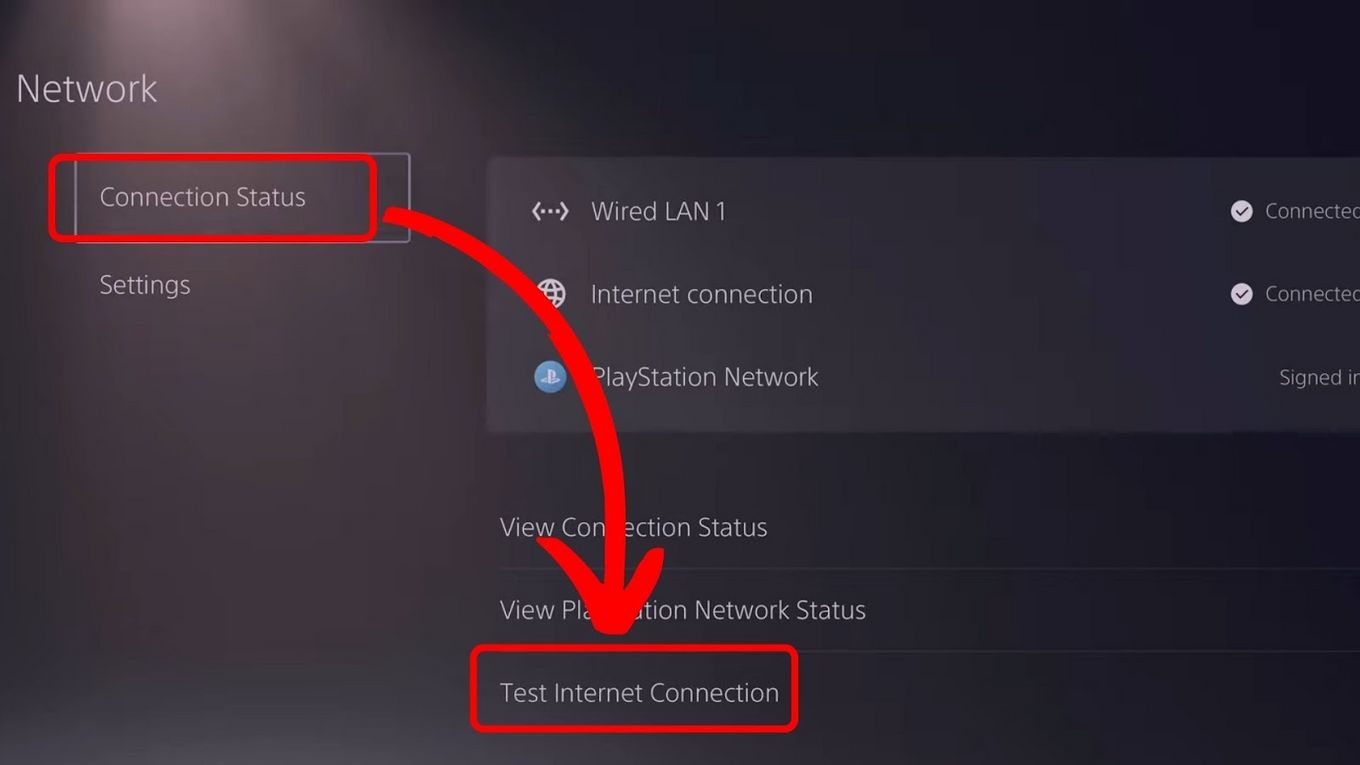
- Go to the Settings menu on your PS5 and select ‘Network’.
- Navigate to ‘Settings’ and then ‘Set Up Internet Connection’.
- Select the hotel’s Wi-Fi network from the list of available networks.
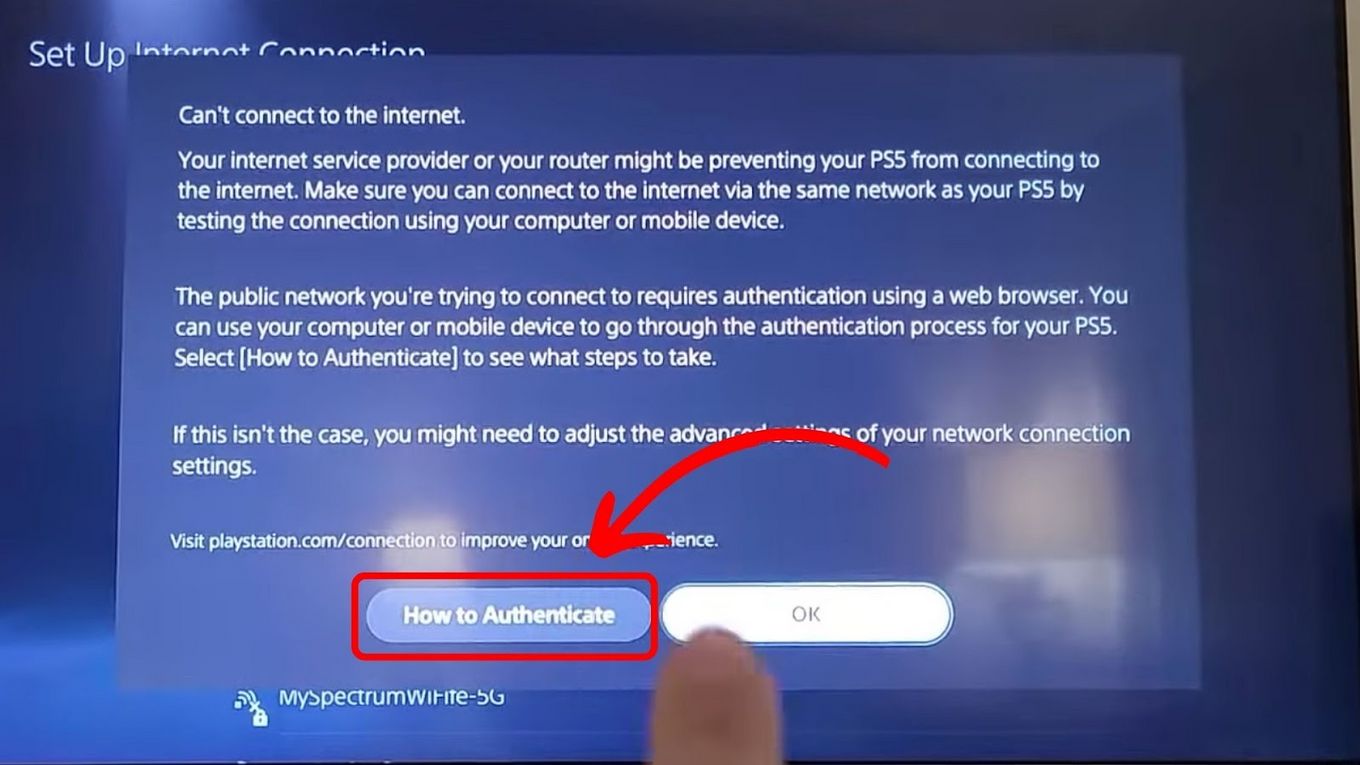
- Once the console attempts to connect and inevitably fails at the “Internet Connection” stage, look for an option that says “How to Connect” or “Authenticate.”
- The PS5 will provide a QR code or a prompt to use a smartphone. By scanning this with your phone, you can link the console’s MAC address to the session you authorize on your mobile device.
This method is increasingly supported by modern apartments and short-term stay facilities that cater to tech-savvy travelers.
The MAC Address Spoofing Strategy
If the built-in authentication fails at a boutique hotel in London or a villa in Italy, you may need to use a more advanced tactic. This involves “spoofing” your console’s Media Access Control (MAC) address.
- First, find your PS5’s MAC address in the system settings.
- Using a laptop, change your laptop’s MAC address to match the PS5’s address.
- Log into the hotel Wi-Fi on the laptop, bypass the captive portal, and accept the terms.
- Turn off the laptop Wi-Fi and turn on the PS5. The hotel’s server will recognize the console as the already-authenticated laptop and allow it through.
Premium Hospitality: Gaming-Focused Amenities and Suites
Recognizing the shift in guest demographics, many hotels in cities like Seoul and Las Vegas are now offering specialized gaming amenities. This eliminates the need for manual configuration and provides a more tailored experience for the digital guest.
Specialized Gaming Rooms in Asia
In Japan, certain hotels have partnered with tech companies to create “Gaming Rooms.” These suites come pre-equipped with high-speed fiber-optic lines separate from the guest Wi-Fi. For example, some properties in Akihabara provide consoles and high-refresh-rate monitors as standard amenities. This trend is also picking up in South Korea, where gaming culture is deeply integrated into daily life.
High-Speed Internet Tiers in Luxury Hotels
Major resorts in the United States, such as the MGM Grand or The Venetian, often offer a “Power User” or “Gaming Tier” of internet access. When you check in, you can request an Ethernet connection—though rare in modern builds—or a dedicated bandwidth slice. If you are staying at Caesars Palace, it is always worth calling the front desk to ask if they have a “whitelist” for gaming consoles, which allows their IT department to manually authorize your device for the duration of your stay.
Security and Stability During Your Stay
While the goal is to get online, security should never be an afterthought when using public or semi-private networks in hotels. Shared networks in busy hubs like New York City or Hong Kong can be vulnerable to data interception.
Utilizing Travel Routers in Guest Rooms
One of the most effective ways to manage connectivity in a resort or apartment is by using a travel router. This small device connects to the hotel Wi-Fi and creates its own private, encrypted network within your room.
- You only have to authenticate the travel router once.
- All your other devices—PS5, laptop, tablet—connect to your private router.
- This adds a layer of firewall protection between you and other guests in the hotel.
Travelers frequenting Europe or Germany find this particularly useful, as many older hotels have thick stone walls that interfere with Wi-Fi signals; placing a travel router near the door can often boost the signal within the suite.
Understanding NAT Types and Privacy
A common issue once connected is the “NAT Type” (Network Address Translation). In many hotels across France or the United Kingdom, the network will be set to NAT Type 3 (Strict). This can prevent you from joining voice chats or multiplayer lobbies. While difficult to change on a hotel-wide router, using a travel router with a VPN can sometimes help shift this to NAT Type 2 (Moderate), which is much better for gaming.
The Future of Guest Connectivity in the Hospitality Industry
As we look toward the future of accommodations, the integration of gaming and high-speed tech is becoming a competitive advantage. Major brands like InterContinental and Accor are beginning to realize that the “digital nomad” and the “traveling gamer” are overlapping demographics.
Seamless Integration and IoT
In the coming years, we expect to see more hotels in tech hubs like San Francisco or Los Angeles implement “One-Click Connectivity.” This technology uses the hotel’s mobile app to automatically push Wi-Fi credentials to any device in the room via Bluetooth or NFC. This would render the struggle of connecting a PS5 to a captive portal a thing of the past.
Conclusion
Connecting your PlayStation 5 to hotel Wi-Fi is more than just a technical hurdle; it is a way to make a temporary space feel like home. Whether you are staying at the Bellagio for a weekend of luxury or an Airbnb in Berlin, understanding the nuances of hospitality networks ensures you spend less time troubleshooting and more time enjoying your stay. By utilizing the built-in authentication tools, travel routers, or simply engaging with the hotel’s IT support, you can ensure that your gaming experience is as seamless as your check-in process. As hotels continue to evolve, the gap between home-level connectivity and travel-based internet will continue to shrink, making the world a much smaller and more connected place for every type of traveler.
LifeOutOfTheBox is a participant in the Amazon Services LLC Associates Program, an affiliate advertising program designed to provide a means for sites to earn advertising fees by advertising and linking to Amazon.com. Amazon, the Amazon logo, AmazonSupply, and the AmazonSupply logo are trademarks of Amazon.com, Inc. or its affiliates. As an Amazon Associate we earn affiliate commissions from qualifying purchases.