
For the modern traveler, a hotel room is more than just a place to sleep; it is a mobile office, a private cinema, and increasingly, a high-tech gaming hub. Whether you are staying at a luxury resort in Dubai or a sleek business suite in London, bringing your entertainment system along has become a standard practice. The PlayStation 5, with its cutting-edge graphics and immersive gameplay, is a favorite companion for those who find themselves far from home. However, the sophisticated security protocols of hospitality networks often create a barrier between your console and the digital world. Understanding how to navigate these systems is essential for any guest looking to maintain their gaming lifestyle while abroad.

The Evolution of Hotel Wi-Fi and Gaming Amenities
The hospitality industry has undergone a digital transformation over the last decade. Brands like Marriott International and Hilton Worldwide have invested millions into their infrastructure to meet the demands of a hyper-connected clientele. In the past, hotel Wi-Fi was an afterthought—a slow, unreliable service intended for basic email checking. Today, high-speed fiber optics are a primary amenity, often prioritized alongside fine dining and spa services.
The Rise of High-Bandwidth Hospitality
In major metropolitan hubs like New York City and Tokyo, premium hotels now offer tiered internet packages. While standard guests might receive enough bandwidth for browsing, “Power User” packages are designed for streaming and gaming. Resorts such as the Bellagio Hotel in Las Vegas have even begun to market their low-latency connections to attract the growing demographic of professional esports players and content creators.
Understanding the Captive Portal Barrier
The primary hurdle for connecting a gaming console to a hotel network is the “captive portal.” This is the web page that pops up requesting your room number and last name. Unlike a smartphone or laptop, the PlayStation 5 does not always automatically trigger this browser interface, leading to a “failed connection” message during the initial setup. This security measure is essential for hotels to manage guest billing and bandwidth allocation, but it requires a specific workaround for hardware that lacks a native, easy-access web browser.
Overcoming the Captive Portal Obstacle
To successfully connect your console at a property like the Four Seasons Hotels and Resorts or a boutique villa in Bali, you must utilize the console’s built-in tools to “trick” the system into displaying the login page.
The “Authenticate” Workaround
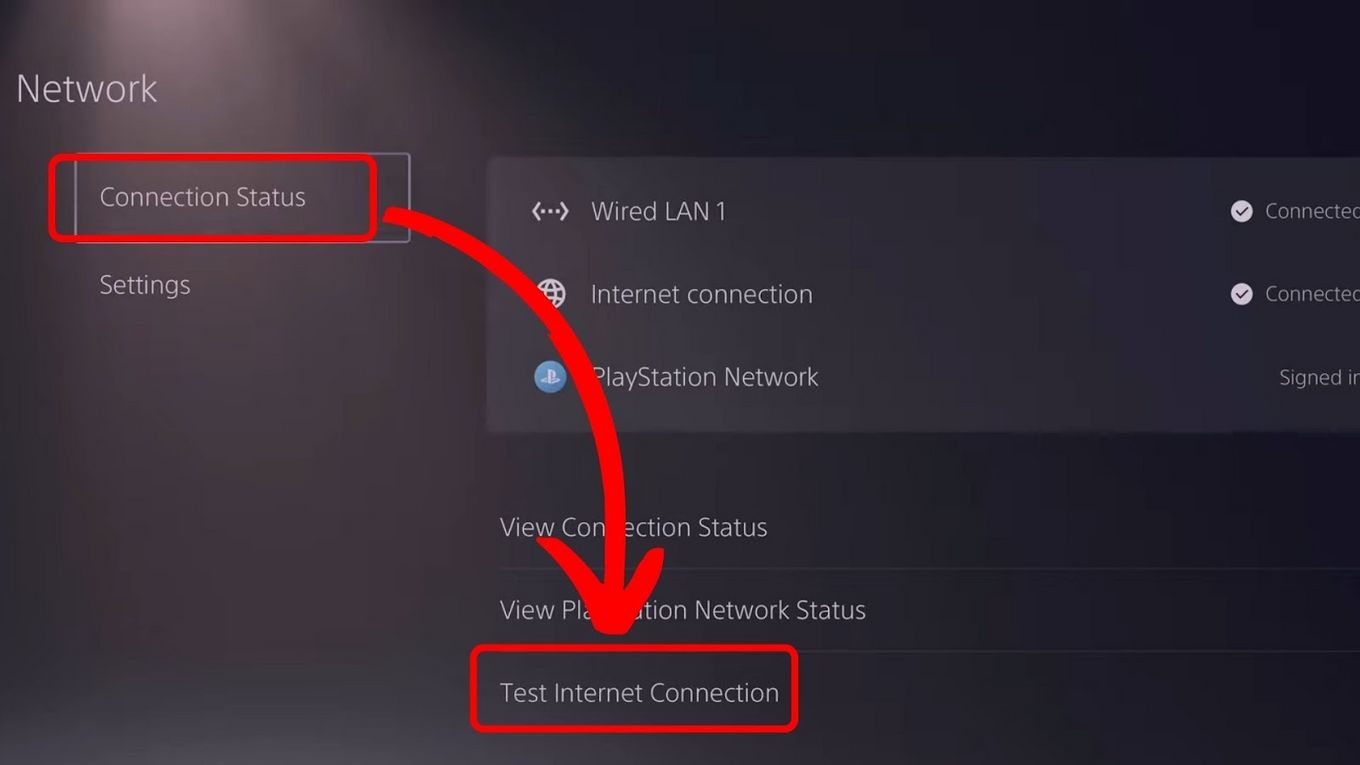
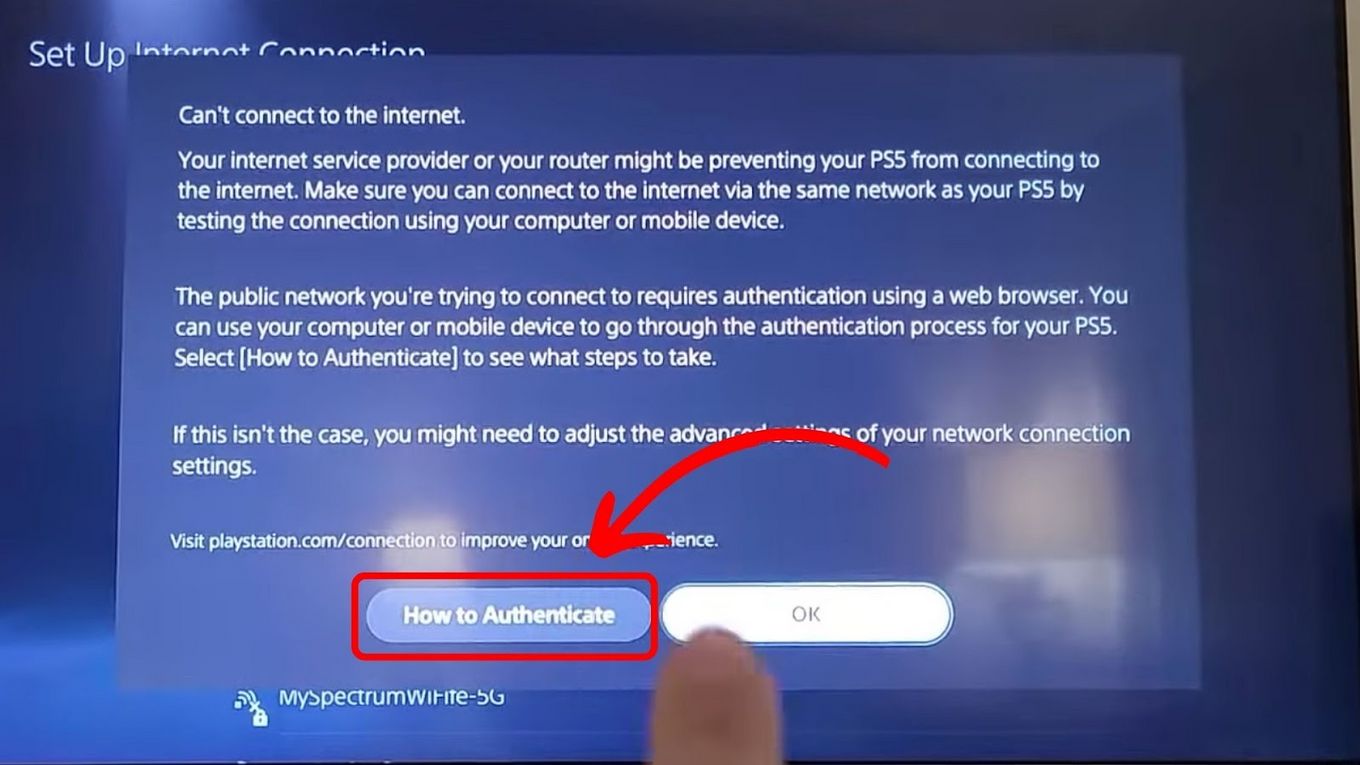
When you attempt to connect to the hotel’s SSID (the network name), the PlayStation 5 will run a connection test. When it fails at the “Internet Connection” stage, look for an option that says “How to Authenticate” or “Connect to the Internet.” This often prompts the console to open a simplified browser window where you can enter the credentials provided by the front desk at the Grand Hyatt Hotel or any other major establishment.
Using the User’s Guide Method
If the automatic prompt does not appear, a clever secondary route involves the system settings. Navigate to the “Settings” menu, then to “User’s Guide, Health & Safety, and Other Information.” By selecting the “User’s Guide,” the console attempts to connect to an external manual. On many hotel networks, such as those found in InterContinental Hotels Group properties, this action will force the captive portal to load, allowing you to sign in and grant the console’s MAC address access to the network.
Advanced Connectivity Techniques for Professional Gamers
For those who frequent high-end accommodations in Singapore or Paris, sometimes the standard Wi-Fi is insufficient for competitive play or large game downloads. In these instances, more robust solutions are required to ensure a stable experience.
Utilizing Wired Ethernet in Business Suites
Many luxury suites, particularly those in the Ritz-Carlton or W Hotels chains, still provide physical Ethernet ports. A wired connection is almost always superior to Wi-Fi, offering lower ping and higher stability. If your room has a desk with a LAN port, plugging directly into the hotel’s backbone can bypass many of the interference issues common in crowded buildings. You may still need to authenticate via the browser method, but the resulting performance will be significantly improved.
The Travel Router Solution
Frequent travelers often carry a “travel router.” This compact device connects to the hotel Wi-Fi (acting as a bridge) and creates its own private network for your devices. This is particularly useful in Germany or Switzerland, where hotel networks can be strictly regulated. By using a travel router, you only have to authenticate one device—the router itself—and your PlayStation 5, laptop, and phone can all share that single connection securely.
The Best Global Hotels for Low-Latency Gaming
Some destinations have embraced the gaming culture more than others, integrating specialized technology into their guest experience. If gaming is a priority for your next trip to South Korea or the United States, certain hotels stand out.
High-Tech Hospitality in East Asia
Japan is a pioneer in “gaming hotels.” In cities like Osaka, you can find accommodations that provide high-end PCs and the latest consoles in every room. These establishments ensure their network architecture is optimized for gaming, with dedicated lanes for high-speed traffic. Similarly, in Seoul, the integration of 5G technology into the hospitality sector means that even mobile hotspots provided by the hotel can support smooth online play.
Luxury Gaming in the Middle East
The Burj Al Arab and the Atlantis The Palm in United Arab Emirates take the guest experience to the extreme. These resorts offer bespoke IT support; if a guest has trouble connecting a console, the hotel’s technical team is often available to manually whitelist the device’s MAC address on their server. This level of service ensures that your stay in Abu Dhabi or elsewhere in the region is as seamless as possible.
Security Best Practices for Hotel Network Users
While the thrill of gaming from a balcony overlooking the Eiffel Tower in France is undeniable, one must not overlook the risks associated with public networks. Hotel Wi-Fi, even in five-star resorts, is technically a shared environment.
Protecting Your Account Data
When you connect to a network at a property like the Mandarin Oriental, remember that other guests are on the same subnet. To protect your PlayStation Network account, ensure that two-factor authentication (2FA) is enabled. While the console itself is relatively secure, the login credentials you enter into a captive portal should be handled with care.
Adjusting DNS Settings for Performance
Sometimes, the default DNS servers provided by the hotel in Australia or Canada are slow and cause lag. By manually changing your console’s DNS settings to public options like Google (8.8.8.8) or Cloudflare, you can often shave milliseconds off your latency. This is a common trick used by gamers staying at the Marina Bay Sands to ensure their connection is as snappy as the local Singapore infrastructure allows.
Monitoring Data Usage in International Resorts
If you are traveling in Italy or Greece, be aware that some boutique hotels may have data caps. Downloading a 100GB game update could inadvertently lead to additional charges on your room bill or a throttling of your speeds. Always check the digital terms of service provided in your room at the Shangri-La Hotel or similar high-end establishments before starting large background downloads.
In conclusion, connecting a PlayStation 5 to hotel Wi-Fi is a manageable challenge that, once solved, elevates the hospitality experience. From the neon-lit streets of Hong Kong to the historic corridors of Rome, the ability to stay connected to your digital community ensures that no matter where you are in the world, home is never more than a controller-press away. By understanding the nuances of hotel network infrastructure and utilizing the correct workarounds, you can turn any hotel room into the ultimate gaming sanctuary.
LifeOutOfTheBox is a participant in the Amazon Services LLC Associates Program, an affiliate advertising program designed to provide a means for sites to earn advertising fees by advertising and linking to Amazon.com. Amazon, the Amazon logo, AmazonSupply, and the AmazonSupply logo are trademarks of Amazon.com, Inc. or its affiliates. As an Amazon Associate we earn affiliate commissions from qualifying purchases.