
Traveling brings the excitement of exploring new destinations, discovering local cultures, and experiencing world-class hospitality. Whether you are staying at the iconic Ritz-Carlton in New York City or unwinding at a cozy boutique property in Kyoto, the evening downtime in your room often calls for relaxation. For many modern travelers, that relaxation involves gaming. However, bringing your PlayStation along on a trip introduces a frustrating technical hurdle: hotel Wi-Fi networks are rarely designed for gaming consoles.
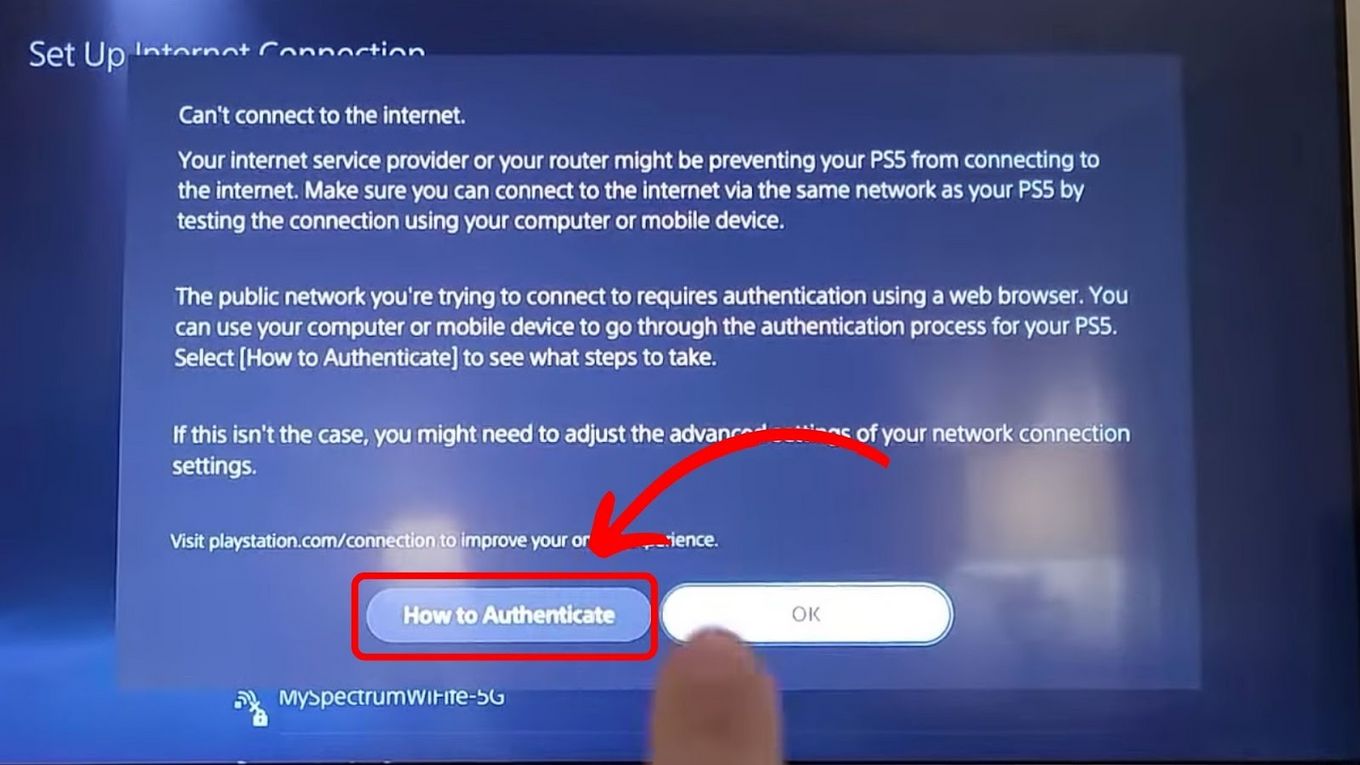
Most hospitality internet systems require a browser-based login, a feature that the PlayStation interface struggles to handle natively. Overcoming this digital roadblock requires understanding how hotel networks operate, utilizing alternative connection methods, and mastering workarounds that get your console online in minutes.

Understanding the Hotel Wi-Fi Challenge
When you check into a property like the Marriott Marquis or a sprawling resort in Maui, connecting your smartphone or laptop to the wireless network is effortless. You select the network, enter a password, and a captive portal page automatically opens in your web browser. This page usually asks you to accept terms of service, enter a room number, or input a specific access code provided at the front desk.
PlayStation consoles, including the PlayStation 4 and PlayStation 5, present a unique challenge because their built-in web browsers are either hidden, difficult to access, or lack the capability to interact with modern, secure captive portal security certificates. When your console attempts to connect to the network, it cannot complete the authentication handshake, leaving you with an error message and no internet access.
Furthermore, hotel networks prioritize general browsing, video streaming, and email traffic for hundreds of simultaneous guests. They often employ strict firewalls, network isolation, and bandwidth throttling. Even if you manage to bypass the login screen, high latency, strict NAT types, and intermittent disconnects can ruin an online gaming session.
Common Network Hurdles for Gamers
- Captive Portals: The primary barrier preventing direct console connection.
- NAT Type Restrictions: Hotels often use strict Network Address Translation, which blocks peer-to-peer connections essential for multiplayer gaming.
- Bandwidth Limitations: Heavy network traffic during peak evening hours can cause severe lag spikes.
- Signal Interference: Thick concrete walls and long corridors in major hubs like the Bellagio in Las Vegas can drastically weaken Wi-Fi strength inside guest rooms.
Method 1: Using a Smartphone or Laptop as a Wi-Fi Bridge
The most reliable, foolproof method to get your PlayStation online in a hotel room bypasses the hotel’s portal restrictions entirely by using a secondary device as an intermediary bridge. This technique tricks the network into thinking your phone or laptop is the only device requesting access.
The Laptop Hotspot Workaround
If you are traveling with a laptop, you can use it to capture the hotel Wi-Fi and broadcast a secondary hotspot for your PlayStation.
- Connect your laptop to the hotel Wi-Fi and complete any necessary web browser login steps.
- Open your laptop’s network settings and navigate to the mobile hotspot or sharing menu.
- Enable the mobile hotspot feature, ensuring it shares your Wi-Fi connection (rather than cellular data).
- Note the network name and password generated by your laptop.
- Turn on your PlayStation, go to network settings, and connect to your laptop’s newly created Wi-Fi signal.
The Smartphone Network Sharing Trick
Travelers without a laptop can often utilize a smartphone, though success depends heavily on the specific operating system and mobile carrier.
- For Android Users: Many modern Android devices allow you to share an active Wi-Fi connection via hotspot, though some carrier restrictions may apply.
- For iPhone Users: iOS typically requires you to use cellular data for personal hotspots, meaning this method would consume your mobile data plan rather than utilizing the hotel’s broadband connection. If you have an unlimited international data plan, this is a viable alternative; otherwise, monitor your data usage closely.

Method 2: Registering Your Console’s MAC Address
Every network-enabled device possesses a unique hardware identifier known as a Media Access Control (MAC) address. Many upscale hospitality properties, such as those managed by Four Seasons or Hilton, feature dedicated IT support desks that can manually whitelist your gaming console.
This advanced method requires a bit of patience and direct communication with the property’s technical support team.
Step-by-Step MAC Address Whitelisting
- Find Your PlayStation MAC Address: Turn on your console without connecting it to the internet. Navigate to Settings, select System, then System Information (or Network Status on PS4), and locate the MAC Address (LAN for wired connections, Wi-Fi for wireless). Write down this alphanumeric code.
- Contact Hotel Support: Call the front desk or the dedicated internet support hotline provided by the hotel. Explain that you need to register a gaming console’s MAC address to bypass the captive portal page.
- Provide the Details: Give the technician your room number and the MAC address you retrieved from your console.
- Connect: Give the system 10 to 15 minutes to update. Afterward, select the hotel network on your PlayStation, and it should connect automatically without needing a browser prompt.
Method 3: Utilizing a Travel Router for Seamless Connectivity
For frequent business travelers or dedicated gamers who frequently stay at properties like the InterContinental in global hubs like London or Paris, investing in a portable travel router is the ultimate long-term solution.
A travel router acts as your personal, secure mini-network. Instead of connecting every individual device—your phone, laptop, and PlayStation—to the hotel’s complex Wi-Fi system, you connect only the travel router.
How Travel Routers Solve the Hotel Wi-Fi Problem
Travel routers feature a built-in web browser interface that allows you to easily complete captive portal logins. Once the travel router successfully authenticates with the hotel network, it broadcasts your own private Wi-Fi network inside the guest room.
- Plug in or power on your travel router.
- Connect your smartphone or laptop to the travel router’s default Wi-Fi network.
- Open a web browser, access the router’s setup page, and select the hotel’s Wi-Fi network from the available list.
- Complete the hotel’s captive portal login page through the router interface.
- Once the router has internet access, turn on your PlayStation and connect it to your travel router’s private network.
This method not only bypasses repeated login screens during your stay, but it also adds an extra layer of cybersecurity, protecting your personal data from potential snooping on shared public networks.
Alternative Solutions and Best Practices for Gaming on the Road
If wireless connections prove too unstable for competitive multiplayer games, physical connection alternatives can drastically improve your experience.
The Power of Wired Ethernet Connections
Whenever possible, bypass Wi-Fi entirely. Many well-appointed hotels offer physical Ethernet ports embedded in the room’s desk or behind the television console. Plugging a standard ethernet cable directly from the wall port into your PlayStation provides the fastest, most stable connection available, entirely eliminating Wi-Fi interference and captive portal login loops in most cases.
Managing Expectations During Peak Hours
Even with the best connection methods, network performance in temporary accommodations fluctuates. During peak evening hours—typically between 7:00 PM and 11:00 PM—hundreds of guests stream movies, download large files, and browse the internet simultaneously. If you experience lag or slow download speeds, consider scheduling large game updates during off-peak morning hours to ensure a smoother gaming experience during your travels.
LifeOutOfTheBox is a participant in the Amazon Services LLC Associates Program, an affiliate advertising program designed to provide a means for sites to earn advertising fees by advertising and linking to Amazon.com. Amazon, the Amazon logo, AmazonSupply, and the AmazonSupply logo are trademarks of Amazon.com, Inc. or its affiliates. As an Amazon Associate we earn affiliate commissions from qualifying purchases.