
For the modern traveler, a hotel room is more than just a place to sleep; it is a temporary sanctuary, a mobile office, and an entertainment hub. Whether you are staying at the Four Seasons Hotel George V in Paris or a tech-forward boutique in Tokyo, bringing a piece of home—like the Sony PlayStation 5—can make a world of difference during a long business trip or a luxury vacation. However, the sophisticated security infrastructure of modern hospitality networks often presents a significant hurdle: the captive portal. Unlike home networks that require a simple password, high-end establishments like Marriott International or Hilton Worldwide use login screens that require guest names, room numbers, or voucher codes. This guide explores the nuanced technicalities and practical solutions for integrating your gaming console into your hotel stay.
Understanding Hotel Captive Portals and PlayStation Connectivity
The primary reason a PS5 struggles to connect to hotel networks is the “captive portal.” This is a web page that users are redirected to before they are granted full internet access. While a smartphone or laptop automatically opens a browser to display this page, the PS5’s operating system is designed primarily for gaming, and its hidden browser does not always trigger the redirect automatically.
The Captive Portal Challenge in Modern Hospitality
In cities like London or New York City, hotels prioritize network security and bandwidth management. By using captive portals, a Grand Hyatt Hotel can ensure that only registered guests are using the high-speed fiber. These systems often utilize a “MAC Address” filtering system. Your PS5 has a unique Media Access Control address, and until the hotel’s server sees that this specific address has “signed the terms and conditions” via the login page, it blocks all traffic.
Why the PS5 Struggles with Hotel Authentication
The PlayStation 5 is a powerhouse of engineering, yet its networking stack is surprisingly rigid. When you attempt to connect to a network at the Bellagio Hotel and Casino in Las Vegas, the console tests the connection by pinging a Sony server. Because the hotel’s firewall intercepts this ping to show the login screen, the PS5 assumes the connection has failed and terminates the attempt before you ever see the browser. Understanding this “fail-safe” mechanism is the first step toward bypassing it.
Step-by-Step Methods to Bypass the Login Screen
Fortunately, the PS5 includes a semi-hidden feature specifically designed to handle these types of public networks. Whether you are overlooking the Burj Al Arab in Dubai or relaxing in a seaside villa in Greece, these methods will help you get online.
Using the “How to Connect” Feature
The most direct way to solve this is by leveraging the PS5’s built-in “Authenticate” tool.
- Navigate to Settings > Network > Settings > Set Up Internet Connection.
- Select the hotel’s Wi-Fi network (e.g., MGM Grand Guest Wi-Fi).
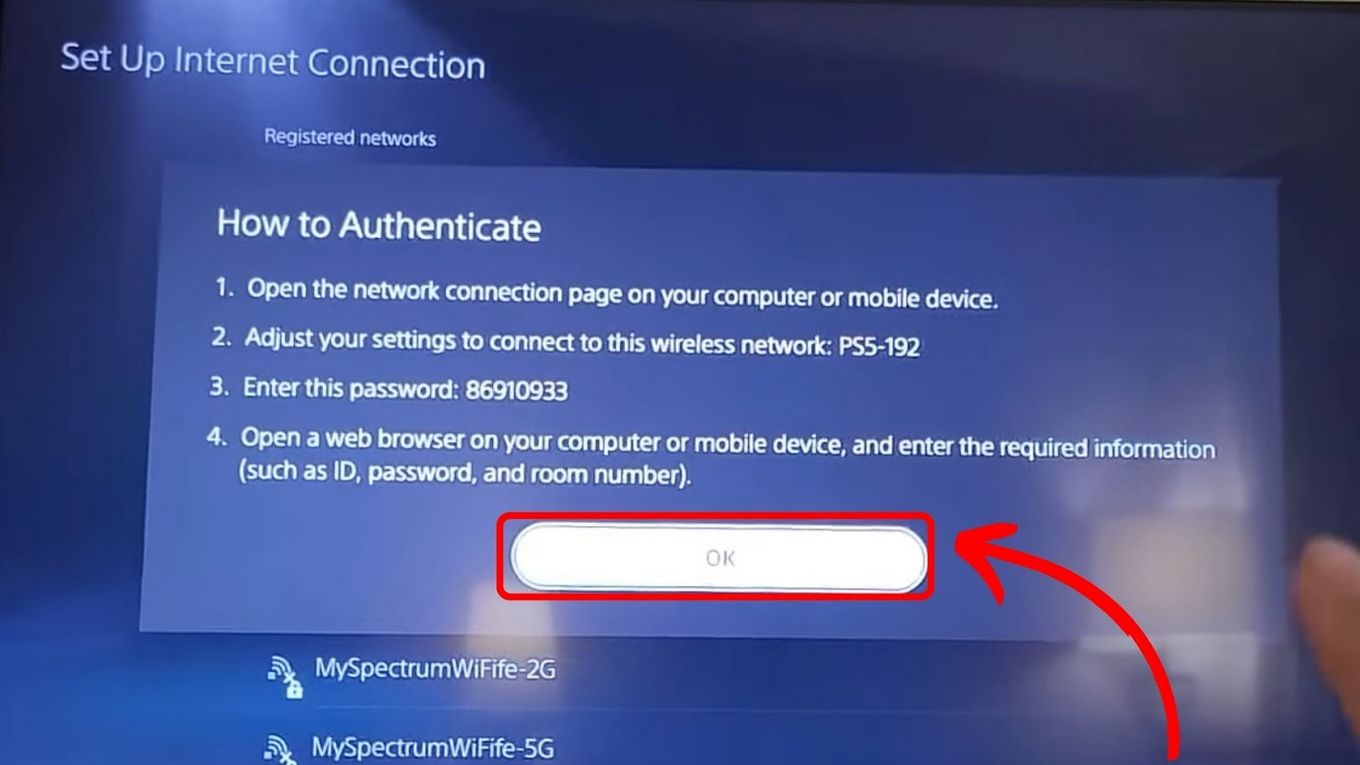
- Once the connection fails or hangs, look for an option that says “How to Connect to This Network” or “Authenticate.”
- This should generate a QR code. Scan this code with your smartphone. Your phone will then act as a bridge, allowing you to enter your room number and last name on your mobile browser, which in turn authenticates the console on the network.
The Smartphone Hotspot Bridge
If the QR code method fails while you are staying at a Ritz-Carlton in Singapore, you can use your smartphone as a temporary middleman.
- Some Android devices allow “Wi-Fi Sharing,” where the phone connects to the hotel Wi-Fi and then broadcasts its own signal.
- Connect your phone to the hotel Wi-Fi and log in.
- Turn on your Hotspot while keeping Wi-Fi active (if your phone supports it).
- Connect the PS5 to your phone’s hotspot. This bypasses the hotel’s login page entirely because the phone has already handled the authentication.
MAC Address Spoofing via Laptop
For the more technically inclined guest staying at a business hub like San Francisco, MAC address spoofing is a foolproof method.
- Connect your laptop to the hotel Wi-Fi and complete the login process.
- Go into your laptop’s network settings and find its Physical Address (MAC Address).
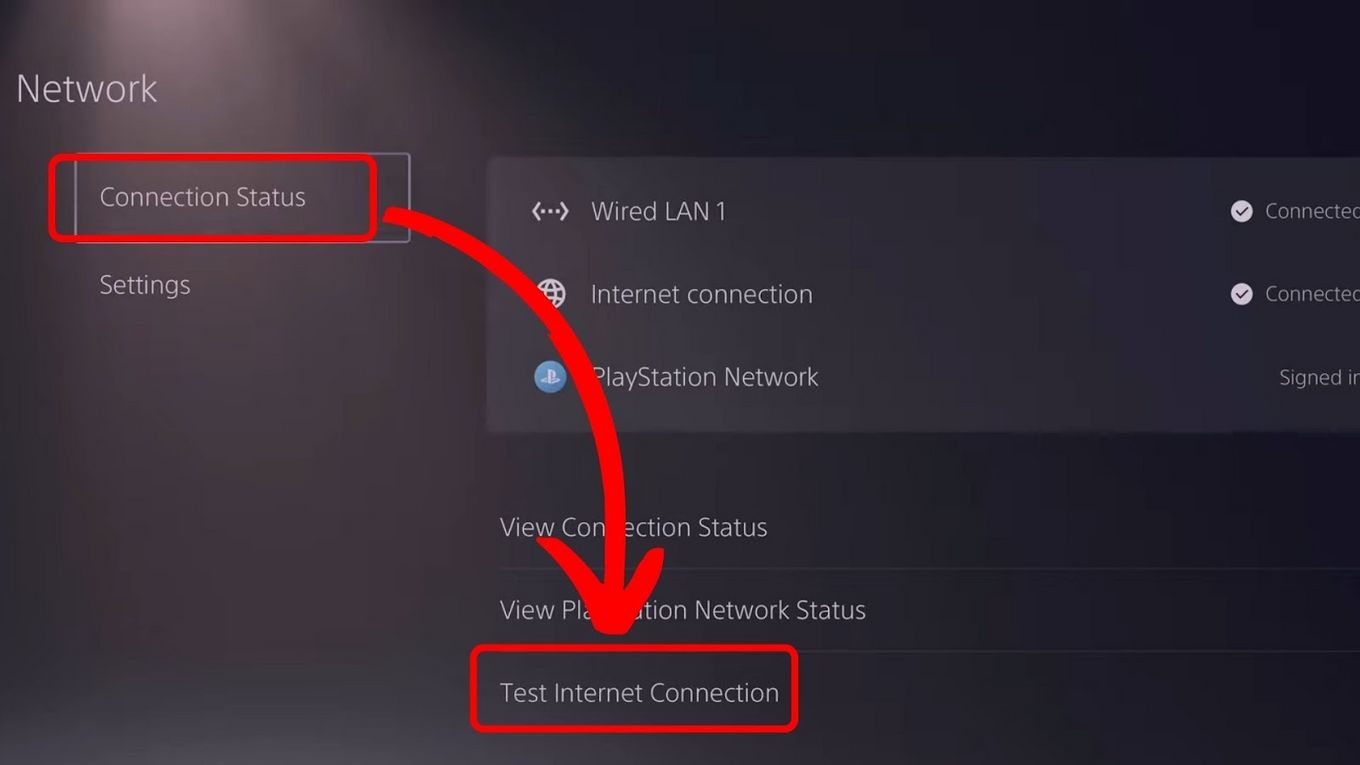
- On your PS5, go to Settings > Network > View Connection Status to find the console’s MAC address.
- Using specialized software on your laptop, change your laptop’s MAC address to match your PS5’s MAC address.
- Re-authenticate on the laptop.
- Turn off the laptop’s Wi-Fi and turn on the PS5. The hotel’s router, seeing the PS5’s MAC address, will think it is the already-authenticated laptop and allow it through.
Enhancing the Gaming Experience in Luxury Suites and Resorts
Connecting is only half the battle; ensuring a lag-free experience is essential, especially if you are competing in online matches from a resort in Mexico or Bali.
Wired Ethernet Connections in Business Hotels
Many premium brands, such as InterContinental Hotels Group, still provide Ethernet ports in their rooms, often hidden behind the desk or the smart TV. A wired connection is almost always superior to Wi-Fi. If you find a LAN port in your room at the Waldorf Astoria in Rome, plug your PS5 in directly. Even if it requires a login, the PS5 is more likely to trigger the authentication page over a wired connection than a wireless one.
Using Travel Routers for a Seamless Network
Frequent travelers to Japan or Germany often carry a “Travel Router.” These small devices connect to the hotel’s Wi-Fi or Ethernet and create a private, encrypted bubble for all your devices.
- You log into the hotel portal once through the router’s interface.
- All your devices (PS5, laptop, tablet) stay connected to your private network.
- This adds a layer of security, as your PS5 is not directly exposed to the hotel’s public network. This is a favorite strategy for guests staying at the Marina Bay Sands.
Potential Troubleshooting and Network Security in Hospitality Environments
Even in the most technologically advanced cities like Seoul, you may encounter roadblocks. Networking in the hospitality industry is complex, and sometimes the “hidden” browser just won’t cooperate.
Contacting the Front Desk or IT Support
If you are at a Sheraton or a Westin and cannot get online, don’t hesitate to call the front desk. Most high-end hotels have a 24/7 technical support line specifically for internet issues. Provide them with your PS5’s MAC address (found in the “View Connection Status” menu), and they can manually “whitelist” your device. This is a common request for gamers staying at the Atlantis The Palm.
Keeping Your Data Secure in Public Spaces
Public Wi-Fi, even in a five-star hotel in London, is inherently less secure than a home network. While the PS5 is generally secure from typical malware, your PSN account information is valuable. Avoid making purchases on the PlayStation Store while connected to an unencrypted hotel network unless you have verified the connection is secure. If you are staying at a boutique hotel near the Eiffel Tower, using a travel router with a built-in VPN is the gold standard for protecting your digital identity.
Dealing with NAT Type Issues
In the world of gaming, NAT (Network Address Translation) Type is crucial. Many hotels in Australia or Canada use strict firewalls that result in “NAT Type 3.” This can prevent you from hosting multiplayer lobbies or using voice chat. While you often cannot change the hotel’s router settings, using a travel router or a laptop-based hotspot can sometimes transition your connection to NAT Type 2, which is much more gaming-friendly.
In conclusion, while connecting a PS5 to a hotel Wi-Fi that requires a login can be a test of patience, it is far from impossible. By utilizing the console’s internal authentication tools, employing a smartphone bridge, or investing in a travel router, you can transform any suite—from the Plaza Hotel in United States to a minimalist retreat in Iceland—into a world-class gaming station. With these steps, the only thing you’ll need to worry about is finding enough time to play before your checkout.
LifeOutOfTheBox is a participant in the Amazon Services LLC Associates Program, an affiliate advertising program designed to provide a means for sites to earn advertising fees by advertising and linking to Amazon.com. Amazon, the Amazon logo, AmazonSupply, and the AmazonSupply logo are trademarks of Amazon.com, Inc. or its affiliates. As an Amazon Associate we earn affiliate commissions from qualifying purchases.