
In the modern hospitality landscape, seamless internet access has transitioned from a premium luxury to a fundamental guest expectation. Whether you are staying in a high-rise executive suite in New York City or a sprawling beachfront villa in Bali, the ability to connect to hotel Wi-Fi is often the first task performed upon entering a room. While most major brands like Marriott International and Hilton have streamlined this process, various technical nuances and security considerations remain essential for the modern traveler to understand.
The Essential Guide to Modern Hotel Connectivity
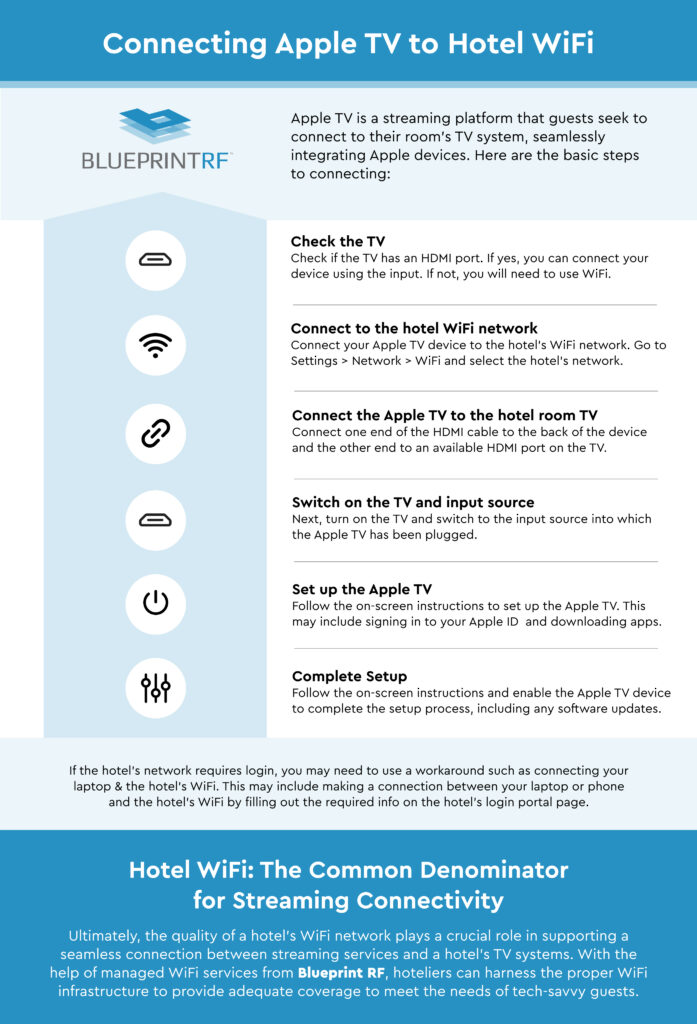
Connecting to a hotel network typically involves more than just selecting a network name and entering a password. Most high-end establishments, from the Four Seasons to InterContinental Hotels Group, utilize a system known as a Captive Portal. This gateway ensures that only registered guests can access the bandwidth, often linking the connection to a room number or a specific guest loyalty account.
The Role of the Captive Portal
The captive portal is a web page that automatically triggers when you first attempt to access the internet through a hotel’s wireless network. When you arrive at a property like The Savoy in London, your device will likely find a network labeled “Savoy_Guest” or similar. Once selected, a browser window should automatically open, prompting you to enter your credentials.
In many United States hotels, this login process requires your last name and room number. In more technologically advanced properties, such as the W Hotels chain, you might be asked to sign in using your Bonvoy credentials to unlock higher-tier speeds. The captive portal also serves as a legal buffer for the hotel, requiring guests to agree to terms of service regarding data usage and prohibited online activities.
Finding Your Network ID (SSID)
In massive resorts like the Atlantis Paradise Island in the Bahamas, finding the correct Service Set Identifier (SSID) can be confusing. Large properties often have multiple networks for different areas, such as the lobby, the pool deck, and the individual guest wings.
Always look for the SSID provided in your check-in materials or on the bedside “Guest Information” card. In premium suites at the Burj Al Arab in Dubai, connectivity is often personalized, with dedicated routers for specific apartments to ensure maximum signal strength and privacy. If you see dozens of networks with similar names, prioritize the one explicitly mentioned by the front desk to avoid “evil twin” networks—malicious hotspots designed to mimic the hotel’s official connection.
Navigating Connectivity Challenges in Luxury Resorts
Even at the world’s most prestigious locations, such as the Mandarin Oriental in Tokyo, guests may occasionally face hurdles when trying to get online. These issues often stem from device settings rather than the hotel’s infrastructure.
Overcoming the “No Internet” Error
One of the most common issues occurs when the captive portal page fails to load. This frequently happens on devices that have a manual DNS (Domain Name System) set or use certain security configurations. If you are staying at the Ritz Carlton in Paris and cannot get the login screen to appear, try navigating to a simple, non-HTTPS website such as “neverssl.com”. This often forces the hotel’s router to intercept the request and redirect you to the login gateway.
Another useful trick for guests at properties like The Peninsula Hong Kong is to clear the browser cache or try a different browser altogether. If your phone or laptop is set to “Private Address” or “MAC Randomization,” some older hotel systems might struggle to assign an IP address. Temporarily disabling these features in your Wi-Fi settings for that specific network can often resolve the handshake issue.
Managing Multiple Devices in Premium Suites
In the modern era of luxury travel, a single guest may carry a smartphone, a tablet, a laptop, and even a gaming console. Some boutique hotels in Italy or France may limit the number of devices per room. However, at major resorts like The Venetian in Las Vegas, multi-device support is usually standard.
For families staying in large apartments or villas, a travel router can be an invaluable tool. By connecting the travel router to the hotel’s Wi-Fi, you create a private sub-network. This allows you to connect all your family’s devices to your own router just once, while the router handles the single connection to the hotel’s system. This is particularly useful in expansive properties like Aman Resorts where you might want to maintain a consistent connection across different areas of a private compound.
Enhancing Security and Privacy During Your Stay
While the convenience of hotel Wi-Fi is undeniable, security remains a paramount concern for business travelers and high-profile guests. Public networks, even those behind a captive portal at a Park Hyatt or Waldorf Astoria, are inherently less secure than private home networks.

Utilizing Virtual Private Networks (VPNs)
Whether you are conducting business from a suite at the Shangri-La in Singapore or simply browsing from a café in Sydney, using a VPN is highly recommended. A VPN encrypts your data, making it unreadable to anyone else on the network, including potential hackers or the hotel’s network administrators.
Some hotel networks are configured with aggressive firewalls that might block VPN protocols to preserve bandwidth. In such cases, switching your VPN protocol to “OpenVPN” or “WireGuard” can sometimes bypass these restrictions. Most luxury brands, including Rosewood Hotels, understand the needs of corporate travelers and ensure their networks are VPN-friendly to facilitate secure remote work.
Understanding the Risks of Open Hotel Networks
When staying at a mid-range apartment or a budget-friendly hotel in Germany, you might find networks that do not require a password at all. These “Open” networks are the most vulnerable. Data transmitted over unencrypted Wi-Fi can be intercepted via “packet sniffing.”
To mitigate these risks, ensure your device’s sharing settings are turned off. On a MacBook, this means disabling File Sharing and AirDrop (or setting it to Contacts Only). On Windows, ensure your network profile is set to “Public” rather than “Private.” This prevents your device from being visible to other guests connected to the same access point at the Fairmont or Loews Hotels.
Specialized Connectivity for Business and Leisure Travelers
The requirements for hotel Wi-Fi vary significantly depending on the guest’s purpose. A digital nomad staying in a long-term apartment in Mexico City has different needs than a family vacationing at Disney’s Grand Floridian Resort in Florida.
High-Speed Requirements for Digital Nomads in Apartments
For those choosing long-term accommodation or “aparthotels” in tech hubs like San Francisco or Seoul, upload speeds are just as important as download speeds. Video conferencing and cloud backups require a stable upstream connection.
Before booking a luxury apartment through platforms like Sonder or a high-end suite at the Langham, many travelers now check crowd-sourced speed tests. Some hotels have recognized this demand and now offer “Premium Internet” tiers. At Marriott properties, members of certain elite tiers often receive these high-speed upgrades for free, ensuring they can handle 4K streaming or heavy file transfers without latency.
Smart Room Integration and IoT in Modern Villas
The evolution of hotel amenities has led to the “Smart Room” concept. In cutting-edge hotels like the Armani Hotel located within the Burj Khalifa, the Wi-Fi does more than just provide internet; it connects you to the room’s ecosystem.
Through the hotel’s Wi-Fi network, guests can use tablets or their own smartphones to control the lighting, climate, and entertainment systems. This integration requires a robust and pervasive wireless signal throughout the suite. If the Wi-Fi connection drops, you might lose control over the curtains or the television at a Bellagio suite in Las Vegas. Therefore, hotels are increasingly investing in mesh network technology to eliminate “dead zones” in large villas and multi-story suites.
Global Standards for Connectivity in Major Hotel Chains
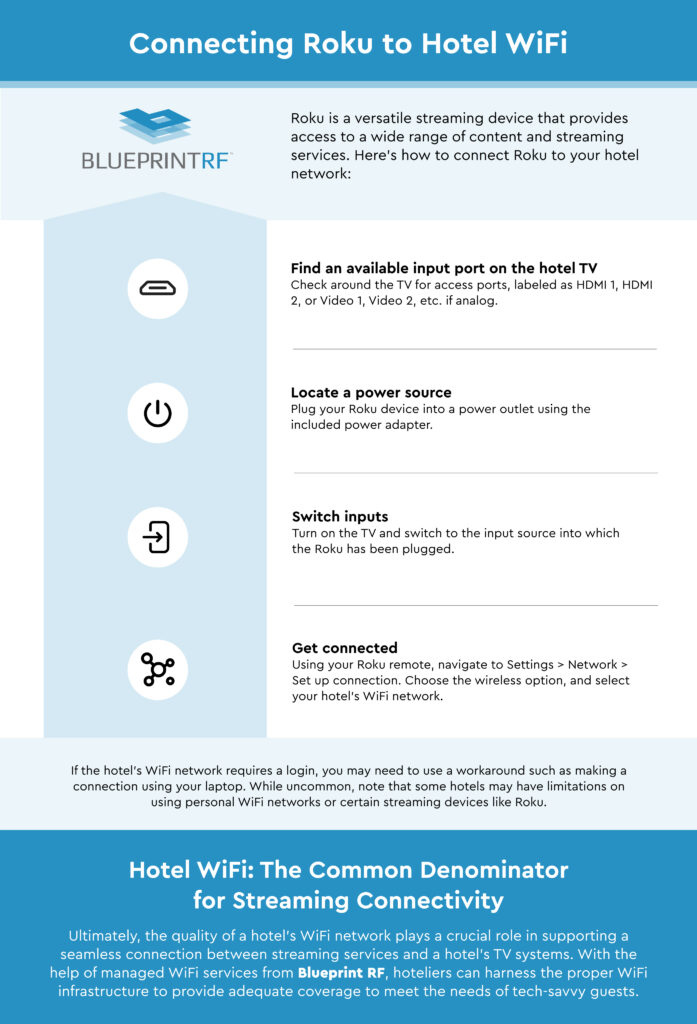
As you travel across different countries, the infrastructure supporting hotel Wi-Fi can change based on local regulations and telecommunications standards. However, global brands strive for a consistent guest experience regardless of the destination.
In China, for example, connecting to Wi-Fi at a Grand Hyatt or a St. Regis may require a local phone number to receive an SMS verification code, in compliance with local internet regulations. Conversely, in the United Kingdom, guest networks are governed by strict data privacy laws that influence how long a hotel can store your connection logs.
In Japan, hotels often provide a “Handy” phone—a dedicated smartphone for guest use that includes free data and serves as a portable Wi-Fi hotspot. This is an excellent amenity found in properties like the Keio Plaza Hotel, allowing guests to maintain connectivity even when they leave the hotel premises to explore the city.
The future of hotel Wi-Fi is moving toward “Passpoint” (Hotspot 2.0) technology. This allows your device to automatically and securely connect to the hotel’s network as soon as you are in range, bypassing the captive portal entirely. Brands like Hyatt are at the forefront of this rollout, aiming to make the transition from cellular data to hotel Wi-Fi as invisible and effortless as possible.
Ultimately, connecting to hotel Wi-Fi is a gateway to the modern guest experience. Whether you are using it to order room service via an app at the Four Seasons Resort Maui or joining a global board meeting from a boardroom in London, understanding the mechanics, troubleshooting the common hurdles, and maintaining a high standard of digital security will ensure your stay remains productive and enjoyable. As hotels continue to innovate with Wi-Fi 6 and 5G integration, the gap between “home-like” connectivity and hotel amenities continues to shrink, making the world more accessible for every traveler.
LifeOutOfTheBox is a participant in the Amazon Services LLC Associates Program, an affiliate advertising program designed to provide a means for sites to earn advertising fees by advertising and linking to Amazon.com. Amazon, the Amazon logo, AmazonSupply, and the AmazonSupply logo are trademarks of Amazon.com, Inc. or its affiliates. As an Amazon Associate we earn affiliate commissions from qualifying purchases.