
The modernization of the travel experience has reached its pinnacle within the gates of the world’s most iconic theme parks. For travelers heading to the United States to visit the sprawling complexes of the Walt Disney World Resort in Orlando, Florida, or the historic Disneyland Resort in Anaheim, California, managing a vacation has moved entirely into the digital realm. The My Disney Experience app, and its West Coast counterpart the Disneyland App, are no longer just optional utilities; they are the primary tools for unlocking every facet of a vacation. From entry into Magic Kingdom Park to unlocking the door at Disney’s Contemporary Resort, knowing how to correctly link your hotel and park tickets is the first step in ensuring a seamless and high-tech adventure.
Navigating the Digital Ecosystem of Disney Destinations
Before diving into the technical steps, it is essential to understand the digital ecosystem you are entering. When traveling to major global destinations, the complexity of the itinerary often dictates the quality of the experience. In the context of Disney travel, your digital account acts as a master key. This account synchronizes your plans across all platforms, including the official websites and the mobile applications.
Setting Up Your Profile and My Disney Experience
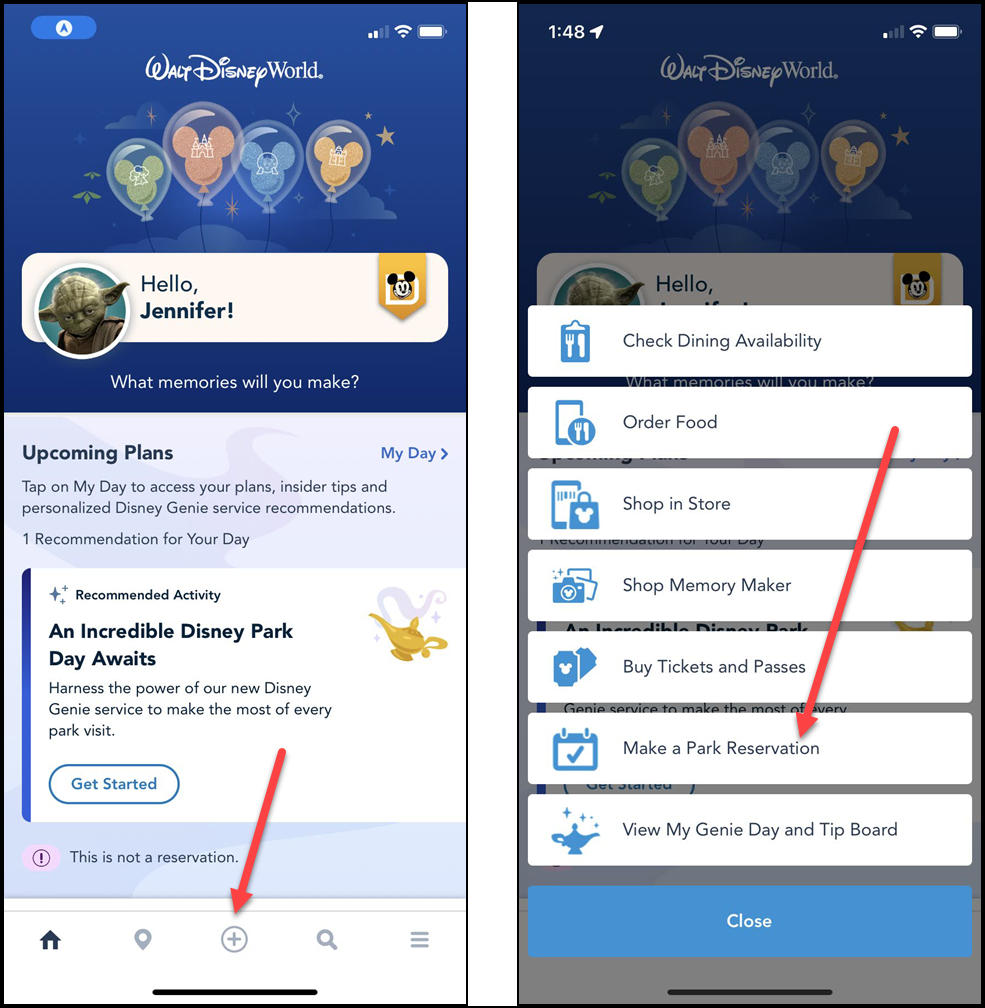
The foundation of a successful trip starts with a single Disney account. This account is universal, meaning if you have ever signed into a Disney-owned streaming service or retail site, you likely already have the credentials needed. Once logged into the app, your “Profile” becomes the hub for your entire travel party. For those visiting EPCOT or Disney’s Hollywood Studios, the app allows you to view wait times, order food, and, most importantly, manage your entitlements.
The Importance of Device Synchronization
Mobile technology has revolutionized the “Lifestyle” of the modern traveler. By enabling Bluetooth and location services on your smartphone, the app can interact with physical points throughout the parks. This is particularly useful when navigating the massive landscape of Disney’s Animal Kingdom Theme Park. The app uses these signals to provide real-time updates and to allow for features like “MagicMobile,” which turns your phone into a contactless entry pass for the parks and your hotel room.
Step-by-Step Guide to Linking Your Park Tickets
Linking your park tickets is perhaps the most critical task to complete before you arrive at the front gates. Without linked tickets, you cannot make dining reservations, join virtual queues for popular attractions, or utilize the digital entry features that expedite your arrival. Whether you purchased your tickets directly through the official website or through a third-party travel agency, the process is designed to be intuitive.
Using Confirmation Numbers and ID Codes
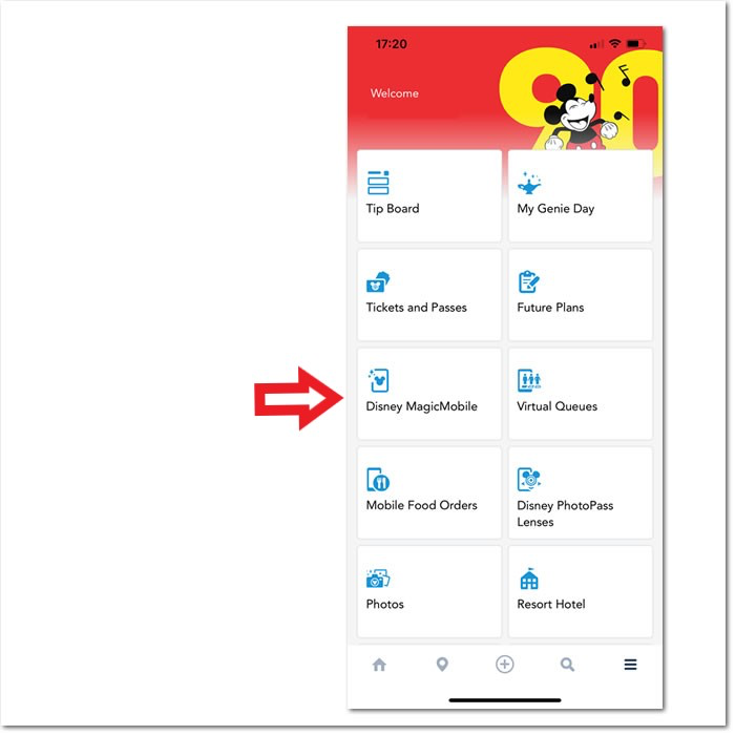
The most common way to link tickets is by using the confirmation number provided at the time of purchase. After opening the app, navigate to the main menu (often represented by three horizontal lines) and select “Tickets and Passes.” From there, you will find an option to “Link Tickets & Passes.” You can manually enter the 12-digit ID code or the confirmation number found in your email. This immediately ties the entitlement to your account, allowing you to see your scheduled days for Disney California Adventure Park or any of the Florida-based parks.
Scanning Physical Media
If you have physical tickets or a printed exchange certificate, the app offers a convenient “Camera” feature. By selecting the “Scan Code” option within the linking menu, you can use your smartphone’s camera to capture the barcode or QR code on your ticket. This is a favorite method for families who may have received physical gift cards or commemorative tickets. Once scanned, the app will ask you to assign each ticket to a specific person in your “Family & Friends” list. This step is vital because it ensures that each member of the group has their own unique digital footprint, which is necessary for entering the parks simultaneously.
Integrating Your Resort Hotel Reservations
Staying on-site at a Disney property offers a level of immersion that is difficult to replicate elsewhere. Whether you are staying at the luxurious Disney’s Grand Floridian Resort & Spa or the artistically themed Disney’s Riviera Resort, linking your reservation to the app unlocks a suite of exclusive benefits. These include early theme park entry, specialized transportation updates, and the “Direct-to-Room” service.
Linking Your Stay at Walt Disney World and Disneyland
To link a hotel stay, go to the “Resort Hotel” section of the app. Similar to ticket linking, you will need your reservation confirmation number and the last name on the booking. For guests at the Disneyland Hotel or the Pixar Place Hotel, linking your stay ensures that you can use the app to check in remotely. This “Mobile Check-In” feature allows you to bypass the front desk entirely; the app will send you a notification when your room is ready, complete with the room number and a digital key.
The Benefits of the Digital Key and Room Charges
Once your hotel is linked, your smartphone becomes a versatile tool within the resort. At Disney’s Polynesian Village Resort, for example, you can use the digital key feature to unlock your room door or access the pool area by simply holding your phone near the sensor. Furthermore, linking your hotel reservation allows you to charge purchases made throughout the parks directly to your room folio, provided you have a valid credit card on file. This creates a “frictionless” spending experience, allowing you to enjoy the shops and restaurants of the parks without constantly reaching for a wallet.
Advanced Management for Groups and Multi-Park Trips
Travel is often a social experience, and Disney vacations are frequently shared with large groups of family and friends. Managing multiple tickets and various hotel rooms requires a bit of coordination within the app’s “Family & Friends” list. This feature allows one person to act as the primary planner, or for everyone to share the responsibility of booking attractions and dining.
Creating a Connected Travel Party
To link other people to your plans, navigate to the “My Profile” section and select “Family & Friends List.” You can add guests by scanning their “Linking Code” (found in their own app) or by entering their name and age. If you are staying at the Disney’s Grand Californian Hotel & Spa with multiple families, ensuring everyone is connected allows you to make “Group” reservations for dining or virtual queues. This connectivity is essential for synchronized entry into the parks, as the system needs to recognize that all parties have valid tickets and, if applicable, the necessary park reservations.
Troubleshooting and App Optimization
Occasionally, travelers may find that a reservation does not appear immediately. This is often due to a mismatch in the email address used for the booking versus the one used for the app login. If a reservation for a stay at Disney’s Contemporary Resort or a ticket for Magic Kingdom Park is missing, the first step is to verify the confirmation number. If the issue persists, the “Chat with Us” feature inside the app provides direct access to a guest service representative who can manually link the entitlements. It is also recommended to keep the app updated to the latest version, as Disney frequently pushes updates to improve the stability of the ticket-linking interface.
Maximizing the App Experience for a Stress-Free Vacation
The ultimate goal of adding your hotel and park tickets to the app is to minimize the time spent on logistics and maximize the time spent enjoying the attractions. A fully integrated app experience allows you to leverage powerful tools that can define the success of your trip.
Utilizing Real-Time Data and Itinerary Planning
With your tickets and hotel linked, the app’s “My Day” feature provides a personalized itinerary. It will show you your upcoming dining reservations at the resort hotels, your park entry times, and even suggestions based on your interests. For a traveler visiting EPCOT, the app can track your progress through the various pavilions and remind you of your scheduled times for high-demand experiences.

The Future of Theme Park Travel
The move toward a mobile-first experience reflects a broader trend in global travel and tourism. By consolidating every aspect of the trip—from the flight details (which can sometimes be added) to the hotel room at Disney’s Grand Floridian Resort & Spa and the entry to Disney’s Hollywood Studios—travelers gain a level of control that was previously impossible. This digital transformation ensures that the focus remains on the “Experience” and the “Lifestyle” of luxury or family travel, rather than the paperwork.
In conclusion, adding your hotel and park tickets to the Disney app is more than a technical requirement; it is the key to unlocking a sophisticated, modern vacation. By following the steps to link your confirmation numbers, scanning physical media, and connecting your travel party, you set the stage for a journey where the only thing you have to worry about is which attraction to visit next. Whether you are walking down Main Street, U.S.A. in California or exploring the futuristic landscapes of Florida, your smartphone, empowered by the My Disney Experience app, is your most valuable companion.
LifeOutOfTheBox is a participant in the Amazon Services LLC Associates Program, an affiliate advertising program designed to provide a means for sites to earn advertising fees by advertising and linking to Amazon.com. Amazon, the Amazon logo, AmazonSupply, and the AmazonSupply logo are trademarks of Amazon.com, Inc. or its affiliates. As an Amazon Associate we earn affiliate commissions from qualifying purchases.