
The Crucial Role of WiFi in Modern Hospitality
In today’s interconnected world, a robust and secure WiFi network is no longer a luxury but a fundamental expectation for guests in any hospitality establishment. From boutique hotels nestled in the heart of Paris to sprawling resorts along the coast of Thailand, seamless internet access is paramount. It enables guests to stay connected with loved ones, manage business affairs, research local attractions like the Grand Palace, and enjoy their digital entertainment. However, providing this convenience comes with significant responsibilities, particularly concerning access control and network security.

Guest Expectations and Security Imperatives
Guests expect their WiFi experience to be as seamless as the check-in process. They anticipate easy connection, reliable speeds, and, most importantly, privacy. Unauthorized access to a hotel’s network can expose sensitive guest data, compromise internal systems, and damage the establishment’s reputation. Therefore, implementing sophisticated access control measures is not just about providing a service; it’s about safeguarding both the guests and the business. This involves differentiating between various user groups, managing bandwidth, and ensuring that each guest’s connection is isolated and secure.
Understanding Ubiquiti’s UniFi Ecosystem for Hospitality
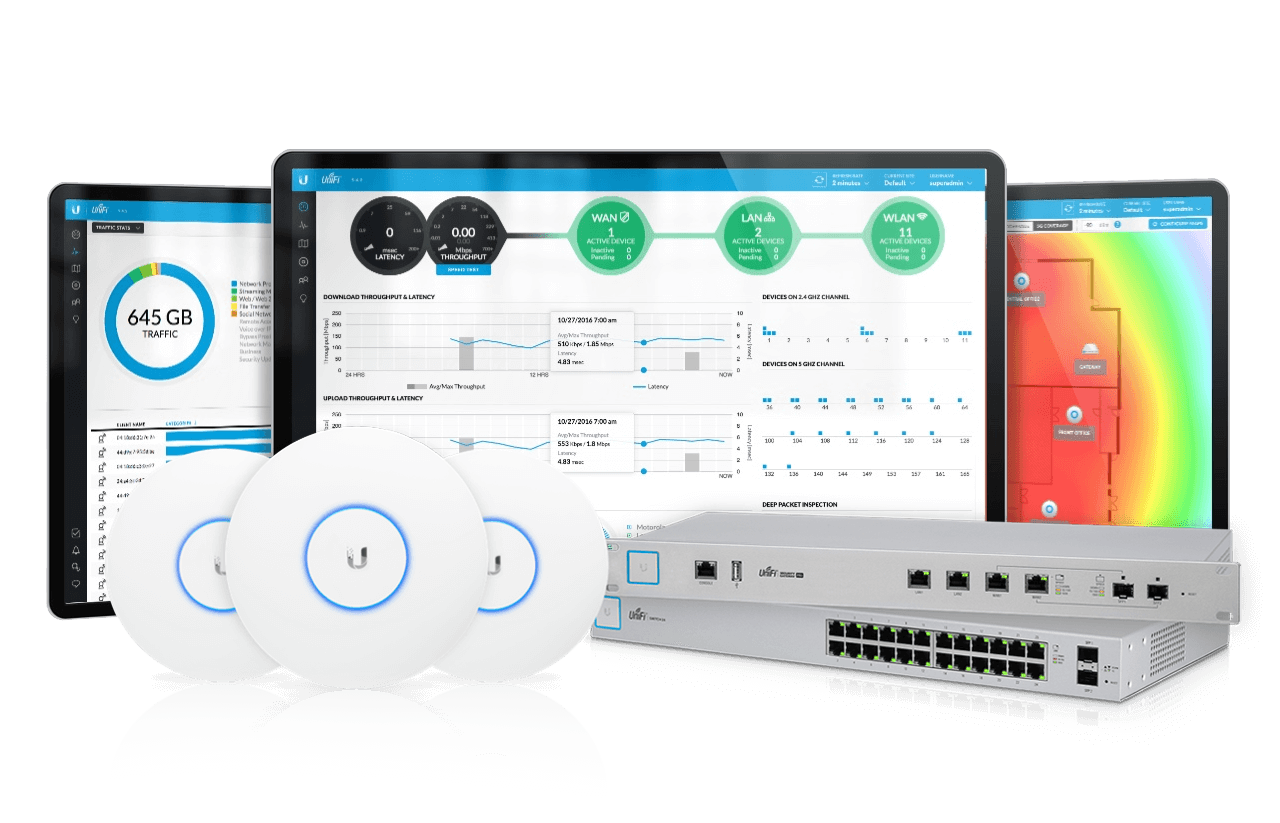
Ubiquiti‘s UniFi ecosystem offers a powerful and scalable solution for managing WiFi networks in environments like hotels, apartments, and other hospitality venues. Its centralized management controller, UniFi Network Controller, provides granular control over access points, switches, and routers, making it an ideal choice for implementing hotel-level WiFi access control.
Key UniFi Components for Access Control
- UniFi Access Points (APs): These are the devices that broadcast the WiFi signal. UniFi offers a range of APs suitable for various deployment sizes, from small inns to large hotels like the Ritz Carlton. Their ability to broadcast multiple SSIDs is crucial for segmenting networks.
- UniFi Security Gateway (USG) or UniFi Dream Machine (UDM) Pro: These devices act as the router and firewall, providing essential network security features and enabling advanced configurations like guest portals and VLANs.
- UniFi Network Controller: This software, which can be run on a dedicated hardware appliance (Cloud Key Gen2 Plus) or a server, is the central brain of the UniFi network. It allows for the configuration, monitoring, and management of all UniFi devices.
Implementing Hotel-Level WiFi Access Control Strategies
Achieving hotel-level WiFi access control requires a multi-layered approach, focusing on authentication, segmentation, and security policies. The UniFi platform excels in enabling these strategies.
1. Multi-SSID Deployment for Network Segmentation
A fundamental aspect of hotel WiFi access control is segmenting the network to isolate guest traffic from internal hotel operations. This is achieved by creating multiple Service Set Identifiers (SSIDs).
Common SSID Configurations:
- Internal/Staff SSID: This SSID is for hotel staff and internal devices. It should be secured with a strong WPA2/WPA3 Enterprise password and potentially a pre-shared key (PSK) for ease of access by authorized personnel. Access to internal hotel resources and management systems should be restricted to this network.
- Guest SSID: This is the primary SSID that guests will connect to. It needs a robust authentication mechanism.
- Management SSID (Optional): A dedicated SSID for managing the UniFi devices themselves, offering an extra layer of security.
VLAN Tagging:
Each SSID can be assigned to a specific Virtual Local Area Network (VLAN). VLANs logically separate network traffic, ensuring that devices connected to the Guest SSID cannot communicate with devices on the Internal/Staff SSID, even if they are physically connected to the same switch. This is a critical security measure for any establishment aiming for hotel-level access control.
2. Robust Guest Authentication Methods
Providing a seamless yet secure way for guests to access the WiFi is key. UniFi offers several authentication methods that can be tailored to different hotel needs.
Pre-Shared Key (PSK):
For smaller establishments or as a secondary option, a simple PSK can be used. However, for true hotel-level control, a unique PSK for each guest room or a rotating PSK system is more appropriate.
- Room-Specific PSKs: Generating unique PSKs tied to room numbers can provide a basic level of accountability.
- Time-Limited PSKs: For enhanced security and management, PSKs can be issued for a specific duration of a guest’s stay.
RADIUS Authentication (WPA2/WPA3 Enterprise):
This is the gold standard for enterprise-level WiFi security and is crucial for hotel-grade access control. RADIUS (Remote Authentication Dial-In User Service) allows for centralized authentication and authorization of users.
- Integration with Property Management Systems (PMS): The ideal scenario involves integrating the RADIUS server with the hotel’s PMS. This allows for automatic generation of unique usernames and passwords for each guest upon check-in, often linked to their room number and length of stay. This significantly enhances security and reduces manual administration.
- Usernames and Passwords: Guests receive unique credentials via their check-in information, ensuring that only registered guests can access the network.
- Accounting and Auditing: RADIUS provides detailed logs of user connections, disconnections, and data usage, which can be invaluable for troubleshooting and security audits.
Captive Portals:
Captive portals are a popular method for guest authentication in hospitality. When a guest connects to the Guest SSID, they are redirected to a customizable web page before gaining full internet access.

- Customizable Branding: The portal can be branded with the hotel’s logo and colors, offering a consistent guest experience.
- Authentication Options on the Portal:
- Click-Through Terms and Conditions: A simple method where guests agree to terms of service.
- Room Number and Last Name Verification: Similar to PSK verification but presented through a web interface.
- Voucher-Based Access: Pre-generated vouchers with unique codes can be issued at the front desk, providing time-limited or bandwidth-limited access. This is excellent for controlling usage and for specific guest tiers.
- Social Media Login (Use with Caution): While convenient, this can raise privacy concerns for some guests and should be implemented thoughtfully.
- Redirects to Hotel Information: The captive portal can also serve as a gateway to hotel services, menus, and local guides for San Francisco.
3. Bandwidth Management and QoS
To ensure a fair and optimal experience for all guests, especially during peak hours, implementing bandwidth management and Quality of Service (QoS) policies is essential.
Bandwidth Limiting:
UniFi allows administrators to set maximum upload and download speeds for individual SSIDs or even for specific clients. This prevents a few heavy users from monopolizing the network’s bandwidth, ensuring that guests can still stream videos or conduct video calls without significant interruption.
Quality of Service (QoS):
QoS prioritizes certain types of network traffic over others. For example, voice and video traffic (like VoIP calls or video conferencing) can be given higher priority than general web browsing or file downloads. This ensures that critical communication services remain stable and performant.
4. Guest Isolation and Security Enhancements
Beyond authentication and segmentation, further measures are necessary to protect guests and the network.
Client Isolation:
Within the Guest SSID, client isolation (also known as AP isolation) prevents devices connected to the same access point from communicating with each other. This is a critical security feature, ensuring that one infected guest device cannot spread malware to other guests’ devices.
- UniFi Setting: This is a configurable option within the UniFi Network Controller for each SSID.
Firewall Rules:
The UniFi Security Gateway or Dream Machine Pro provides powerful firewall capabilities. Rules can be configured to:
- Block access to internal networks: Reinforce VLAN segmentation by explicitly blocking traffic from the Guest VLAN to the Internal VLAN.
- Control internet access: Define which ports and protocols are allowed for guest access.
- Implement content filtering (optional): Restrict access to certain websites or categories of content, which might be desirable for family-friendly establishments or to comply with local regulations.
Intrusion Detection/Prevention Systems (IDS/IPS):
Advanced UniFi security gateways offer IDS/IPS capabilities, which can monitor network traffic for malicious activity and automatically block potential threats. This adds a significant layer of security against cyberattacks.
Centralized Management and Monitoring with UniFi Network Controller
The true power of UniFi for hotel-level access control lies in its centralized management platform.
Dashboard and Insights:
The UniFi Network Controller dashboard provides real-time insights into network performance, connected clients, and potential issues. Administrators can monitor:
- Connected Devices: See how many devices are connected to each SSID.
- Bandwidth Usage: Track overall bandwidth consumption and identify heavy users.
- AP Status: Ensure all access points are online and functioning correctly.
- Client Health: Monitor signal strength and connection quality for individual clients.
Configuration and Deployment:
- Easy Setup: The controller simplifies the deployment of SSIDs, VLANs, and security policies across multiple access points.
- Remote Management: If the controller is hosted on a cloud key or a remote server, network administrators can manage the hotel’s WiFi from anywhere in the world, ensuring continuous service and quick resolution of any issues. This is particularly useful for hotel chains with multiple properties.
Firmware Updates and Security Patches:
Regularly updating the firmware on UniFi devices is crucial for maintaining security and performance. The UniFi Network Controller facilitates the scheduling and deployment of these updates, ensuring that the network is protected against the latest threats.
Conclusion: Elevating the Guest Experience Through Secure WiFi
Implementing hotel-level WiFi access control on Ubiquiti hardware is an investment in guest satisfaction and operational security. By leveraging features such as multi-SSID deployment with VLANs, robust authentication methods like RADIUS and captive portals, effective bandwidth management, and strong firewall configurations, hotels can create a WiFi experience that is both convenient and secure. The centralized management capabilities of the UniFi Network Controller empower hospitality businesses to efficiently manage their networks, providing a reliable and protected internet connection that meets the high expectations of today’s travelers, whether they are on a business trip to New York or on vacation at a Maldives resort. This meticulous attention to network infrastructure ultimately contributes to a superior guest experience and reinforces the establishment’s commitment to service excellence.
LifeOutOfTheBox is a participant in the Amazon Services LLC Associates Program, an affiliate advertising program designed to provide a means for sites to earn advertising fees by advertising and linking to Amazon.com. Amazon, the Amazon logo, AmazonSupply, and the AmazonSupply logo are trademarks of Amazon.com, Inc. or its affiliates. As an Amazon Associate we earn affiliate commissions from qualifying purchases.